
Handling Large Payloads in Unmeshed Processes
Learn how to handle large files in an Unmeshed process by using Unmeshed Python Steps to download files to mounted storage, process them, and clean them up after execution.

Introduction
Large payloads do not always belong inside request bodies, step outputs, or execution state. When a process needs to work with Excel files, CSV exports, reports, or other bulky documents, it is usually better to store the file temporarily and let the workflow operate on the file path instead of pushing the full payload through every step.
This approach keeps the process cleaner, reduces unnecessary payload movement, and makes file-heavy automation easier to manage.
In this post, we will walk through an Unmeshed process that:
- Downloads a file from a remote URL into mounted Unmeshed storage
- Reads and processes the file inside an Unmeshed Python Step
- Deletes the file after processing is complete
Why Handle Large Payloads This Way
For small JSON inputs, passing data directly between steps is simple. For large files, that pattern becomes inefficient.
Common issues with large inline payloads include:
- bloated request or response sizes
- slower step-to-step data movement
- harder debugging when outputs become too large
- unnecessary memory pressure during execution
Using mounted storage gives you a better pattern:
- the file is downloaded once
- subsequent steps read it from disk
- only useful metadata and results are returned in step output
- the temporary file can be removed at the end of the process
In Unmeshed, /app/files is mounted to Unmeshed file storage. That makes it the correct location for temporary file-based processing inside a process execution.
You can verify uploaded files from FileBrowser under Data and Assets in Unmeshed. This is where files written to mounted storage can be viewed after they are uploaded by a process step.
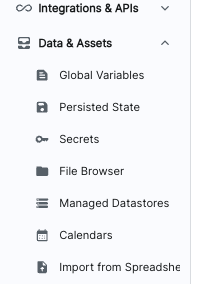
The image above shows File Browser under Data and Assets, where you can inspect files that have been uploaded to Unmeshed storage.
Use Case
Assume an upstream system provides an Excel file through a signed URL or file endpoint. The process needs to:
- fetch the file
- parse the spreadsheet
- generate a quick summary
- clean up the temporary copy
That is exactly what the large_payload_handling process does.
Process Overview
The process contains three Unmeshed Python Steps:
temp_upload_to_unmeshed_storageread_records_and_processdelete_file
Suggested image placeholder:
Process definition screenshot goes here
Step 1: Download the File in an Unmeshed Python Step
The first Unmeshed Python Step downloads a remote Excel file and stores it under /app/files/myfiles/customFile.xlsx.
This matters because /app/files is mounted to Unmeshed storage. If you save the file elsewhere, the next step may not be able to access it in the same expected way.
import os
import requests

def main(steps, context):
    file_url = "https://testing.s3.amazonaws.com/abcd/pqr/1234/myfile.xlsx"

    # /app/files is mounted to Unmeshed file storage
    file_path = "/app/files/myfiles/customFile.xlsx"

    os.makedirs(os.path.dirname(file_path), exist_ok=True)

    try:
        with requests.get(file_url, stream=True, timeout=60) as response:
            response.raise_for_status()

            with open(file_path, "wb") as f:
                for chunk in response.iter_content(chunk_size=8192):
                    if chunk:
                        f.write(chunk)

        return {
            "statusMessage": f"File downloaded and saved to {file_path}",
            "isSuccessful": True
        }

    except Exception as e:
        return {
            "statusMessage": f"Download failed: {str(e)}",
            "isSuccessful": False
        }
What this Unmeshed Python Step does
- downloads the file as a stream instead of loading it fully into memory
- writes the content in chunks
- creates the target directory if it does not already exist
- returns a status message for execution visibility
Streaming is important here because it is a safer pattern for larger files.
Step 2: Read and Process the File in an Unmeshed Python Step
Once the file is available in storage, the second Unmeshed Python Step opens it with pandas and performs sample processing.
import pandas as pd

def main(steps, context):
    file_to_process = "/app/files/myfiles/customFile.xlsx"

    try:
        df = pd.read_excel(file_to_process)

        row_count = len(df)
        column_count = len(df.columns)
        columns = list(df.columns)

        df = df.fillna("N/A")

        numeric_summary = {}
        numeric_cols = df.select_dtypes(include=["number"]).columns
        for col in numeric_cols:
            numeric_summary[col] = df[col].sum()

        preview_data = df.head(5).to_dict(orient="records")

        return {
            "rowCount": row_count,
            "columnCount": column_count,
            "columns": columns,
            "numericSummary": numeric_summary,
            "preview": preview_data
        }

    except Exception as e:
        return {
            "statusMessage": f"Error processing file: {str(e)}",
            "isSuccessful": False
        }
What this Unmeshed Python Step returns
Instead of returning the full spreadsheet content, this step returns a compact and useful summary:
- total row count
- total column count
- list of columns
- numeric column summary
- preview of the first five rows
This is a much better output contract than passing the entire file content through the workflow state.
Step 3: Delete the Temporary File in an Unmeshed Python Step
After processing is complete, the last Unmeshed Python Step removes the file from storage.
import os

def main(steps, context):
    file_path = "/app/files/myfiles/customFile.xlsx"

    try:
        if os.path.exists(file_path):
            os.remove(file_path)
            message = "File deleted successfully"
        else:
            message = "File does not exist"

        return {
            "statusMessage": message,
            "isSuccessful": True
        }

    except Exception as e:
        return {
            "statusMessage": str(e),
            "isSuccessful": False
        }
Cleaning up temporary files is a good operational habit. It helps prevent storage buildup when the process runs repeatedly.
End-to-End Flow
The full execution looks like this:
- Fetch the Excel file from a remote location
- Save it to
/app/files - Open it in an Unmeshed Python Step
- Extract useful summary data
- Delete the temporary file
This pattern is simple, reliable, and practical for file-based workflows.
Process Definition Summary
Below is the same process expressed in documentation format for easy reference.
Process Metadata
- Name:
large_payload_handling - Version:
1 - Namespace:
default - Type:
API_ORCHESTRATION
Step Definitions
1. temp_upload_to_unmeshed_storage
- Type:
PYTHON - Purpose: An Unmeshed Python Step that downloads a remote Excel file and stores it in Unmeshed-mounted storage
- Input source: Remote file URL
- Output: Status of file download
2. read_records_and_process
- Type:
PYTHON - Purpose: An Unmeshed Python Step that reads the Excel file and generates a compact summary
- Input source: File stored at
/app/files/myfiles/customFile.xlsx - Output: Row count, column count, column names, numeric summary, and preview rows
3. delete_file
- Type:
PYTHON - Purpose: An Unmeshed Python Step that deletes the temporary file after processing
- Input source: File path in mounted storage
- Output: Deletion status
Full Process Definition
In this process definition, the Python code is authored directly inside each Unmeshed PYTHON step.
{
  "orgId": 1,
  "namespace": "default",
  "name": "large_payload_handling",
  "version": 1,
  "type": "API_ORCHESTRATION",
  "steps": [
    {
      "name": "temp_upload_to_unmeshed_storage",
      "type": "PYTHON",
      "ref": "temp_upload_to_unmeshed_storage",
      "input": {
        "script": "Python code inside the Unmeshed step downloads the file from a remote URL and stores it under /app/files/myfiles/customFile.xlsx"
      }
    },
    {
      "name": "read_records_and_process",
      "type": "PYTHON",
      "ref": "read_records_and_process",
      "input": {
        "script": "Python code inside the Unmeshed step reads the Excel file using pandas, computes summary information, and returns a compact preview"
      }
    },
    {
      "name": "delete_file",
      "type": "PYTHON",
      "ref": "delete_file",
      "input": {
        "script": "Python code inside the Unmeshed step deletes the temporary file from mounted Unmeshed storage"
      }
    }
  ]
}
Best Practices for Large Payload Workflows
- store large files in mounted storage instead of workflow state
- stream downloads when possible
- return summaries, not full file contents
- keep file paths predictable across steps
- always clean up temporary files after processing
If your workflow handles CSV files, PDFs, reports, or generated documents, this same pattern works well with only minor changes to the processing step.
Final Thoughts
Large payload handling in Unmeshed is straightforward when you treat the file as a temporary resource rather than as step-to-step inline data.
By combining mounted storage with Unmeshed Python Steps, you can build workflows that download, process, and clean up large files in a controlled and maintainable way.