Shipping a SaaS is the easy part now. You put up a landing page, open a free trial, and signups start showing up.
What happens after the signup is where things get messy.
You've got people sitting inside a 14-day trial. You don't know who's using the product, who's silently giving up on it, or who paid yesterday. You meant to email them on Day 3. Then Day 7. You forgot. Or worse: you remembered, and sent a "trial ends tomorrow" reminder to someone who upgraded two days ago.
Small things, but they add up. A funnel that does this badly is barely better than no funnel at all.
So I built one in Unmeshed.
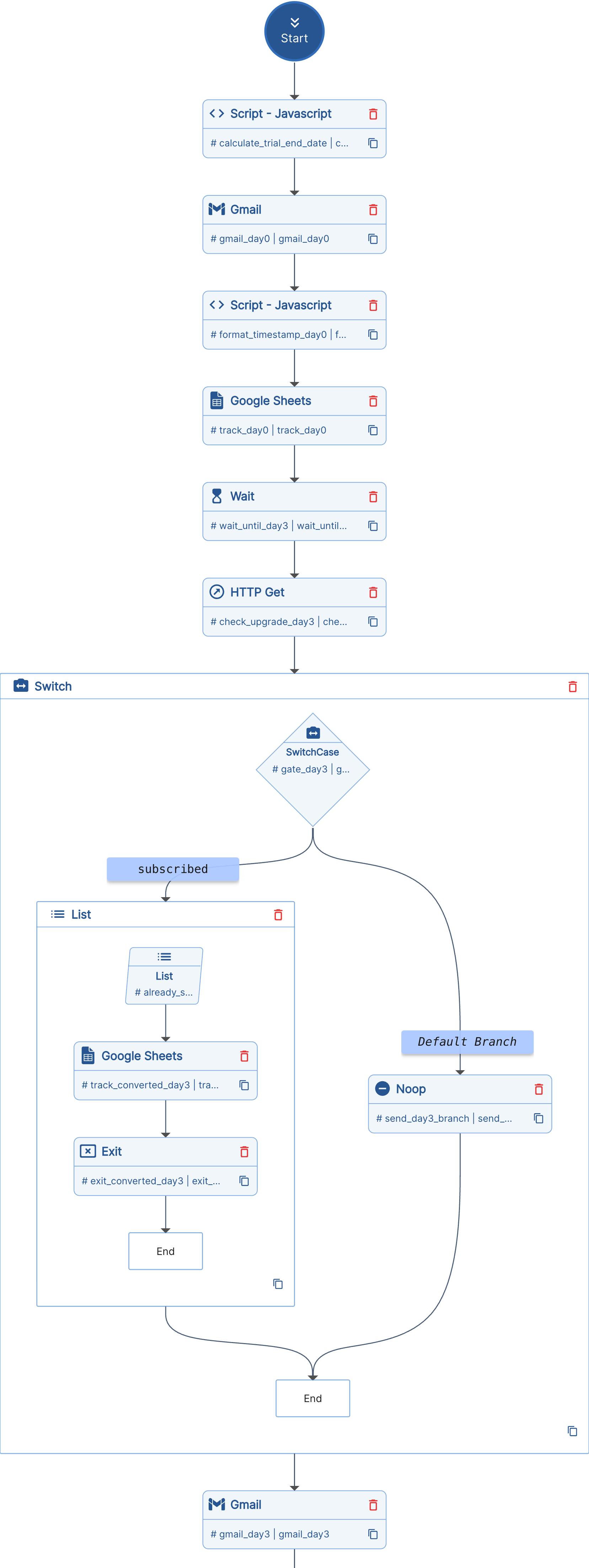
Five emails over fourteen days, on Day 0, 3, 7, 11, and 13. Before every send after Day 0, the workflow hits your API and checks if the user has upgraded. If they have, it exits and logs the conversion. No "last chance" emails to paying customers.
Emails go out through Gmail. Sends and conversions get appended to a Google Sheet, which ends up being a perfectly fine lightweight CRM once you have a few rows in it.
Want to try this exact flow? Open the SaaS Trial Onboarding template and adapt it to your trial funnel.
Most trial funnels fail the same two ways
Either nothing goes out, because the founder is busy shipping and Day 3 quietly turns into Day 9. Or a cron job blasts the full sequence regardless of who's converted, churned, or moved on.
Both leak revenue, and both feel sloppy to the user on the receiving end.
A funnel that actually works has to do three things. Reach people at the right moments. Stop the moment someone upgrades. And leave a trail so you can look at what happened later.
The third one is what most setups skip, and it's the reason most founders have no idea where their funnel actually leaks.
Walking through it
I'll use a fake SaaS called Stagepad for the examples. Pretend it's a hosted staging environment tool for solo devs. The shape works for anything on a 14-day trial.
1. Trigger and trial window
The workflow fires when someone signs up. It gets two fields:
{
  "userEmail": "[email protected]",
  "userName": "Alex"
}
The first step is a tiny JavaScript step that calculates the trial end date (today plus 14 days) and formats it into something readable, like Thursday, June 12th. Every email in the funnel references this date, so the user always sees the same concrete deadline instead of a vague "your trial is ending soon."
2. Day 0: Welcome
The welcome email goes out right away. It covers what they get on the trial, what to expect over the next two weeks, and the trial end date.
Two things happen in the background after the send: the timestamp gets captured, and a row gets appended to the tracker sheet with the user's email, name, trial end date, Day 0 send time, and in_progress as the status. From here on, the sheet has one row per trial user, and the row keeps getting updated as the funnel moves forward.
3. Wait, then check before sending
Here's the part that makes it honest.
Every send after Day 0 follows the same three steps. Wait until the right day. Hit the upgrade-status API. Branch on the result.
The wait is a native Unmeshed WAIT step. No cron, no external scheduler, nothing fragile sitting on your laptop. The workflow pauses for 72 hours, then 96, then 96 again, then 48.
The upgrade check is a plain GET to your own API:
GET https://api.stagepad.com/v1/users/upgrade-status?email=[email protected]
Authorization: Bearer ...
Your API returns { "subscribed": true } or { "subscribed": false }. A SWITCH step reads it:
(steps, context) => {
  const subscribed =
    steps.check_upgrade_day3.output.response &&
    steps.check_upgrade_day3.output.response.subscribed === true;
  return subscribed ? "subscribed" : "not_subscribed";
};
If they subscribed, the workflow logs converted_before_day3 with a timestamp and exits. If not, the email goes out and the send gets logged.
That gate runs again before Day 7, Day 11, and Day 13. Four chances to catch a conversion before sending the wrong email.
4. The five emails
Quick summary of what each one is doing:
- Day 0, Welcome. Trial access, what to expect.
- Day 3, Value tip. A specific action that gets them a real result from the product. Hints at what paid unlocks.
- Day 7, Mid-trial highlight. One strong paid feature and the problem it solves.
- Day 11, Soft nudge. Three days left, what they keep on the paid plan. No urgency theatrics.
- Day 13, Last chance. Trial ends tomorrow. Honest framing: if the product has been useful, here's the upgrade link; if not, no hard feelings.
Every email references the trial end date from Step 1, so the deadline stays specific.
5. The tracker sheet
Every send appends a row. Conversions append a row too, with an Upgraded At timestamp and an exit reason like converted_before_day7.
After a few weeks the sheet starts being useful on its own. You can see who's at what stage, when emails went out, where conversions tend to land (Day 3? Day 11? After Day 13?), and which users went completely silent.
No Mixpanel. No HubSpot. A sheet you can open.
One more thing: setup is a workflow too
The tracker sheet itself gets created by a separate one-time workflow.
You run create-trial-tracker-sheet once. It creates a sheet titled SaaS Trial Tracker, writes the header row across twelve columns (Email, Name, Trial End Date, the five send timestamps, Upgraded, Upgraded At, Exit Reason, Workflow Run ID), and returns the spreadsheet ID and URL.
Paste the ID into the main funnel workflow as variables.tracker_sheet_id and you're done. Setup isn't a README full of clicks, it's a workflow you run once.
What this replaces
For a solo dev or a small team, this usually takes the place of:
- A calendar reminder to email trial users that you'll forget
- A Mailchimp or Customer.io account you started configuring six months ago and never finished
- A
setTimeout-based scheduler in your backend that breaks every time you deploy - Nothing, which is the most common option and the most expensive one
What separates this from a generic drip tool is the upgrade check. Most email tools can send on a schedule. Stopping cleanly when someone converts usually means webhooks, audience syncing, and glue code you'll have to maintain. Here it's one HTTP call and one switch per email.
Closing
A trial funnel sounds small until you start writing one.
Five emails over fourteen days isn't much code. But once you add "stop if they upgrade," "log every send," "remember each user's trial end date," and "survive me closing the laptop for the weekend," it stops being a weekend project.
Define it once as a workflow and Unmeshed handles the waiting, the branching, and the logging. You go back to building the product.
If your trial emails are spread across a calendar, a half-configured email tool, and a few cron jobs you're afraid to touch, Unmeshed gives you one place to define and run the whole sequence, including the part where it stops at the right time.
Bring your own onboarding, trial, or lifecycle flow and we can help you shape it.