
I am writing this at exactly 2 a.m., and I am still annoyed about a phone call from this afternoon. Forty minutes on hold with my own insurer to change one address.
One.
That is not a customer service problem. That is an insurance workflow automation problem, and it happens to be exactly what this blog is about.
The person who finally picked up was not slow or bad at their job. They were buried under the same routine request a thousand other people needed that day, and not one of those needed a human to begin with.
McKinsey found that insurers leading on AI earned 6.1 times the shareholder return of the ones lagging behind, the widest gap of any industry. That gap was never about staffing. It came down to who stopped doing by hand what a rule could handle on its own.
This post walks through seven processes worth automating first, what each one saves, and how to start.
1. What Insurance Workflow Automation Actually Is (And Why It Matters Now)
Insurance workflow automation means using technology to handle the repetitive, rule-based work that eats up your team's day, without a person having to touch every step. It is not digitization. It is not scanning paper into a computer and calling it progress. It is the actual work getting done on its own.
Research suggests up to 45% of work activities across the insurance value chain can be automated with technology that already exists today.
Think about a claim coming in. The system pulls the details, checks them against your rules, sends it to the right adjuster, and confirms receipt with the customer. Nobody touches it until it hits a point that genuinely needs a human to weigh in.
Why does this matter so much right now? Because two things are pulling in opposite directions. Customer expectations keep climbing while your team's capacity stays flat.
Look at what everyone is asking for at once:
- Customers want answers in hours, not days
- Regulators want more compliance proof, not less
- Carriers need to grow without adding headcount at the same pace
Insurance AI deployments grew 87 percent year over year into 2025, and the carriers moving first are pulling away from the ones still deciding.
Automation is the one thing that moves all three, which is exactly why insurance digital transformation has stopped being a someday project.
2. The 7 Insurance Workflow Automation Processes That Deliver the Biggest Returns
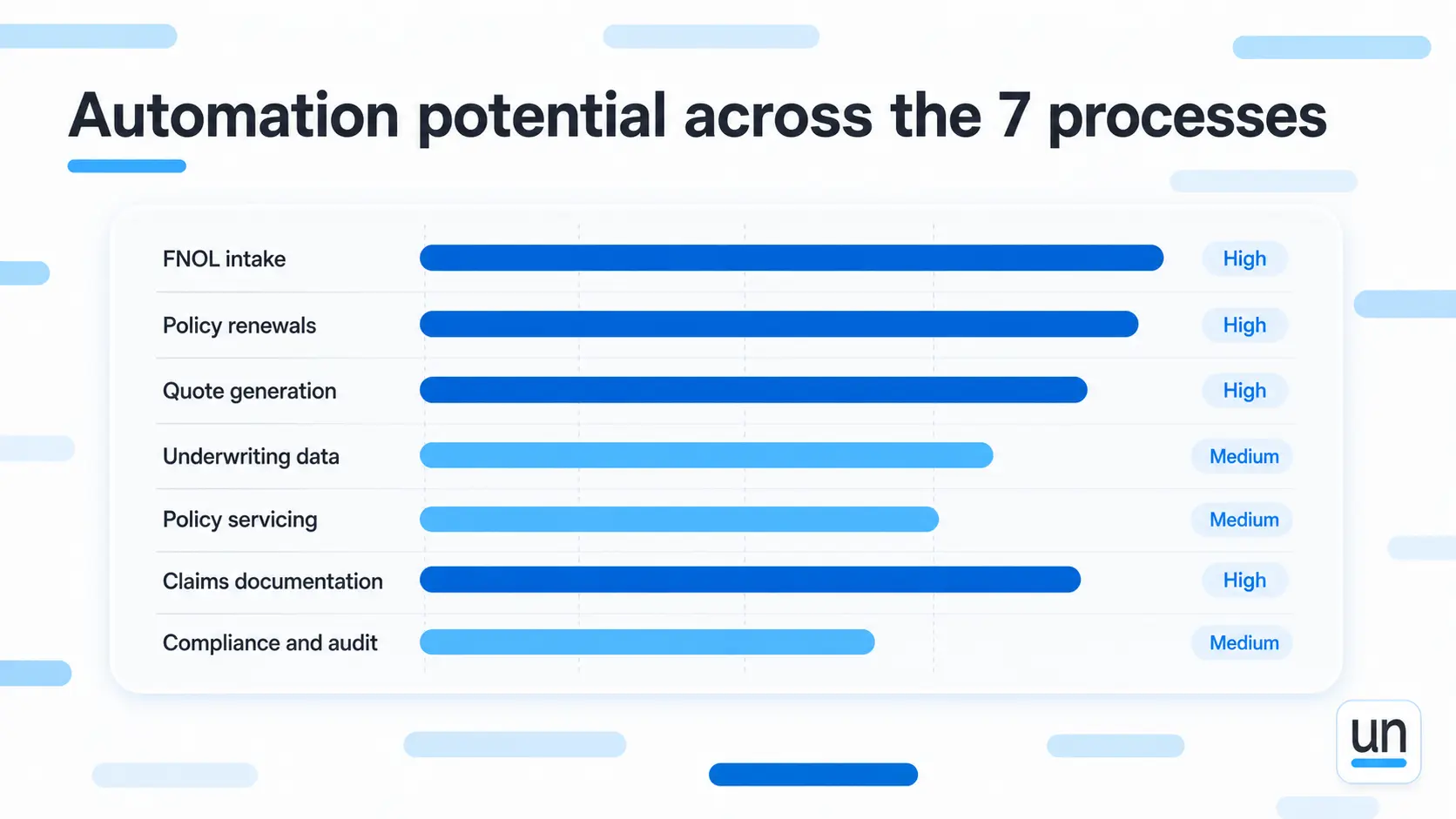
Your budget and your time are both limited, so start where the return is fastest. These seven represent the highest volume work in most insurance operations, and they pay back quicker than anything else you could pick.
A. FNOL Intake
First notice of loss is where speed matters most. A customer has a problem; they reach out, and the next few minutes decide whether they stay or start shopping around.
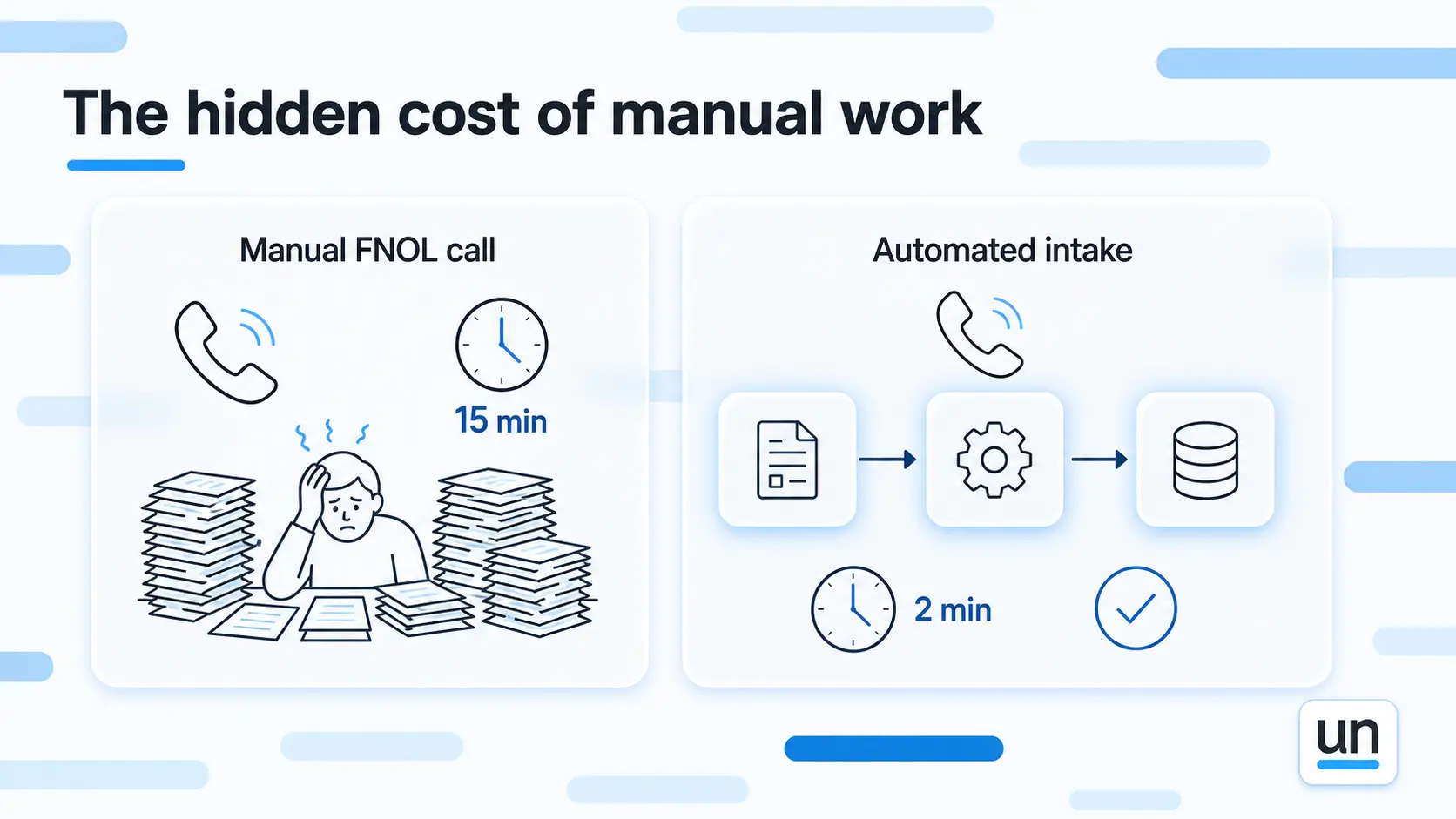
Done by hand, one call ties up a staffer for at least 15 minutes. They have to:
- Pick up the phone and calm the customer down
- Ask the questions in the right order
- Type the notes
- Route the claim to the right adjuster
At 5,000 calls a month, that adds up to roughly 1,250 hours of staff time.
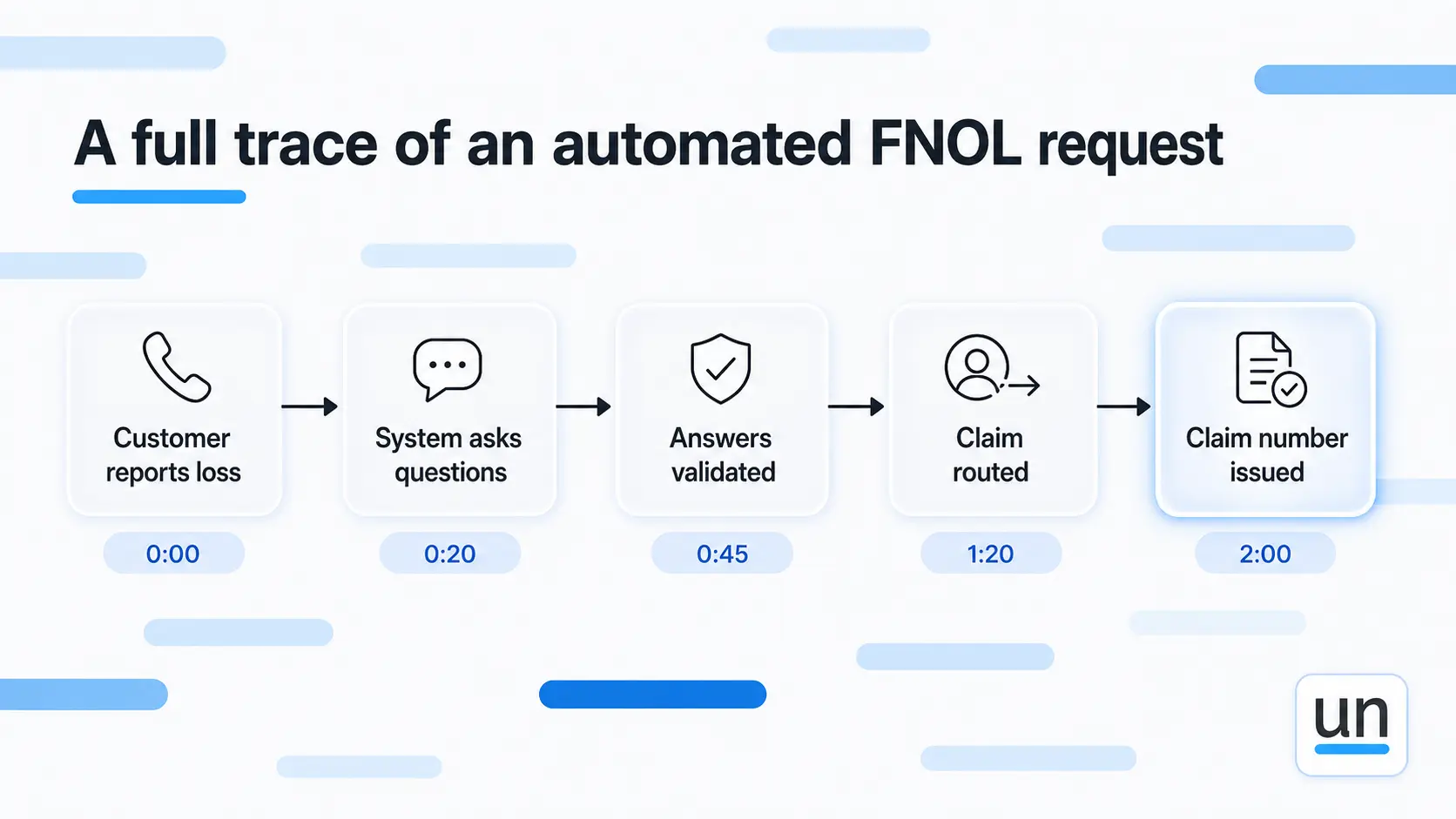
Automated intake works differently. The system takes the call or form, asks the questions in order, and validates each answer as it lands. It routes the claim, hands the customer a claim number on the spot, and gives the adjuster a clean case to open.
Intake drops from 15 minutes to about 2. That saves more than a thousand hours a month, so one person handles what used to take a room of twenty.
If your workflows extend into lending, our loan application processing solution page covers a similar pattern.
See this exact workflow, ready to run
Get the FNOL-to-settlement template, prebuilt with AI extraction, rule-based coverage checks, and adjuster review steps.
B. Policy Renewals
Renewals are pure volume. Notices go out, and then the responses scatter in every direction. Some call with questions, some need documents resent, some adjust coverage, and plenty just pay.
The manual version has staff working through mail, email, and phone calls while updating the system by hand. At 10,000 renewals a month, that turns into a mess fast.
Automation runs the whole thing end to end:
- Notices go out on schedule
- Anyone making a change moves through a guided flow instead of an email thread
- Payments process and confirm on their own
- Quiet customers get automatic reminders by phone, text, or email
Nobody touches it unless something breaks a rule and needs a person. That is more than 2,000 hours a month back on the calendar, with renewals that once took three exchanges now closing in one.
C. Quote Generation and Quote Follow-up
A producer gets a quote request and, done by hand, logs into a few systems, gathers the details, runs the numbers, formats the document, sends it, and chases the follow-up. One quote runs 20 to 30 minutes.
At 2,000 requests a month, that is over a thousand hours of manual quoting.
Automation captures requests from your website, email, phone, or broker portal. It gathers the information, runs it against your rules, and sends the finished quote back in minutes.
If a quote goes unanswered past a set window, the system follows up on its own. If one gets abandoned, it flags the producer to step in personally.
The producer now spends their hours closing rather than formatting. Turnaround falls from a full day to minutes, which saves more than 800 hours a month and tends to lift close rates, because speed wins deals.
Automation does not replace your producers. It gives them time to close deals instead of push paper.
D. Underwriting Data Gathering
Underwriters run on information, and a lot of it. Medical records, financial statements, prior claims history, credit reports.
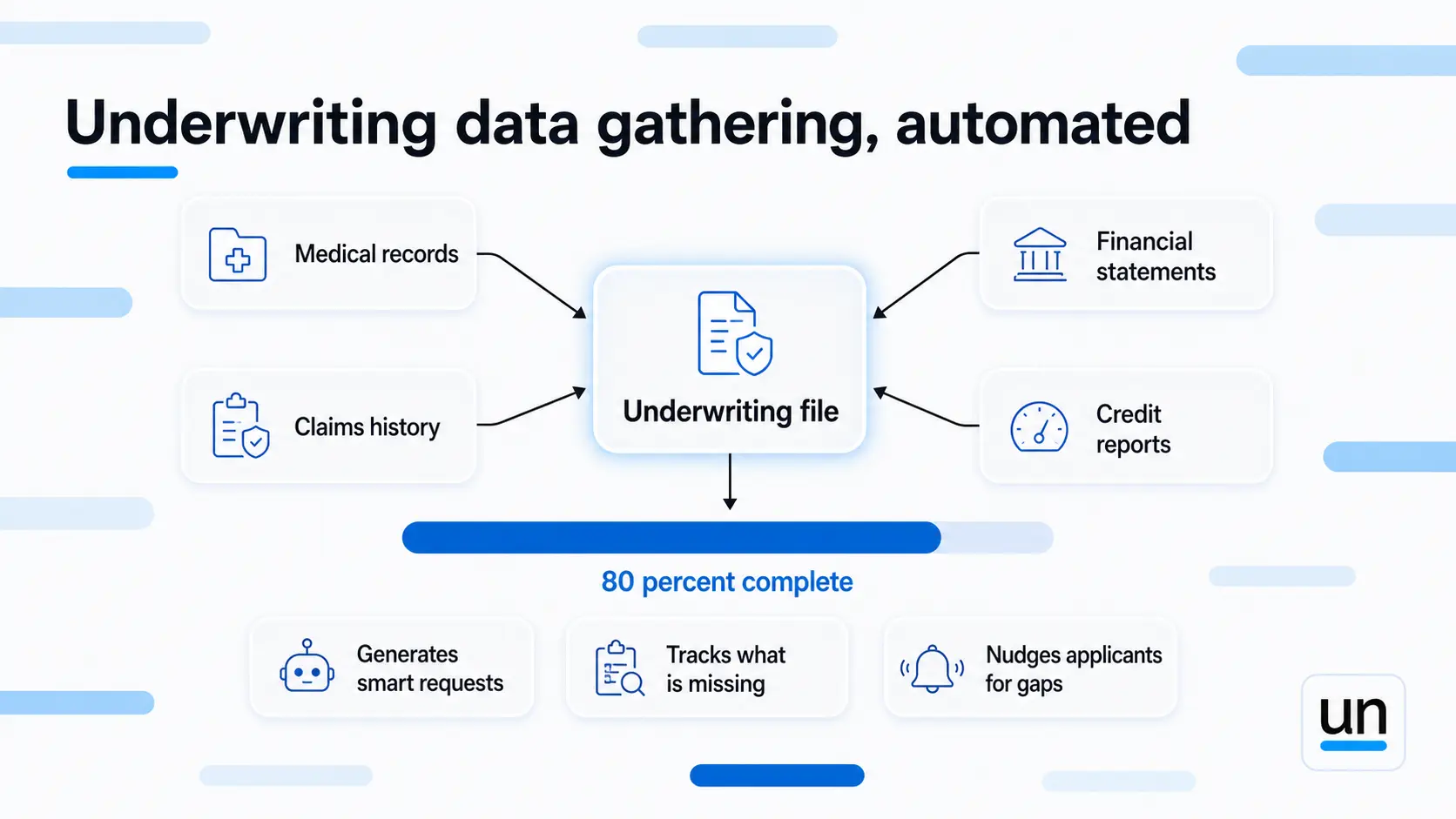
Done manually, assistants request each document, chase the applicant, receive it, organize it, and prep it. A single complex case can pull from ten sources across several rounds of back and forth.
Policy underwriting automation connects straight to your data providers and pulls what it can on its own. From there it:
- Generates smart requests for whatever it cannot find
- Tracks what has come back against what is still missing
- Nudges applicants for the gaps
By the time the underwriter opens the file, around 80 percent of the data is already there and organized. That takes 30 to 40 percent of assistant time off the table and gets to a decision faster.
E. Policy Servicing Requests
Customers reach out constantly for routine things. A copy of the policy, proof of coverage, an address change, a payment question, a change of beneficiary.
These follow a fixed pattern and need no real judgment, yet staff handle each one by hand. At 3,000 requests a month, that is over 500 hours spent on the same handful of tasks on repeat.
Automation answers these through phone, chat, or email, pulling the information from your system and sending the document back in seconds. Anything that needs approval or hits an exception gets flagged for a human, while the routine majority resolves on its own.
That returns more than 400 hours a month, and customers get their answer immediately instead of waiting days for a callback.
F. Claims Documentation and Verification
Claims handlers lose real time to finding and organizing files. Scanning documents, sorting them by type, matching them to the right claim, checking nothing is missing. None of it adds value, and all of it slows the claim down.
Claims automation ingests documents as they arrive and identifies each one using OCR and machine learning. From there it:
- Pulls the key data like dates, amounts, and parties
- Organizes everything by claim
- Flags whatever is missing
The handler knows exactly what they are looking at before they even open the file. That clears 20 to 30 percent of document handling time and speeds up every claim.
AI-assisted claims processing is approximately 75% faster than traditional methods, with some carriers cutting resolution time from 30 days down to 7.5.
G. Compliance and Audit Workflows
Regulators want documentation, internal audits want proof of process, and compliance reporting has to show what happened and when.
Done by hand, that means gathering files, building spreadsheets, and compiling reports. A single audit request can swallow 40 hours or more.
Automation keeps the audit trail on its own:
- It records what decision was made, who made it, when, and why
- It generates compliance reports on demand
- It flags likely violations before a regulator ever does
When an audit lands, the documentation is already sitting there waiting. That saves over a thousand hours a year and closes the door on findings caused by missing paperwork.
Compliance that runs automatically is compliance that never fails.
3. How the Savings Actually Stack Up
The math is worth doing plainly. Add up the hours across all seven processes and the total is hard to ignore.
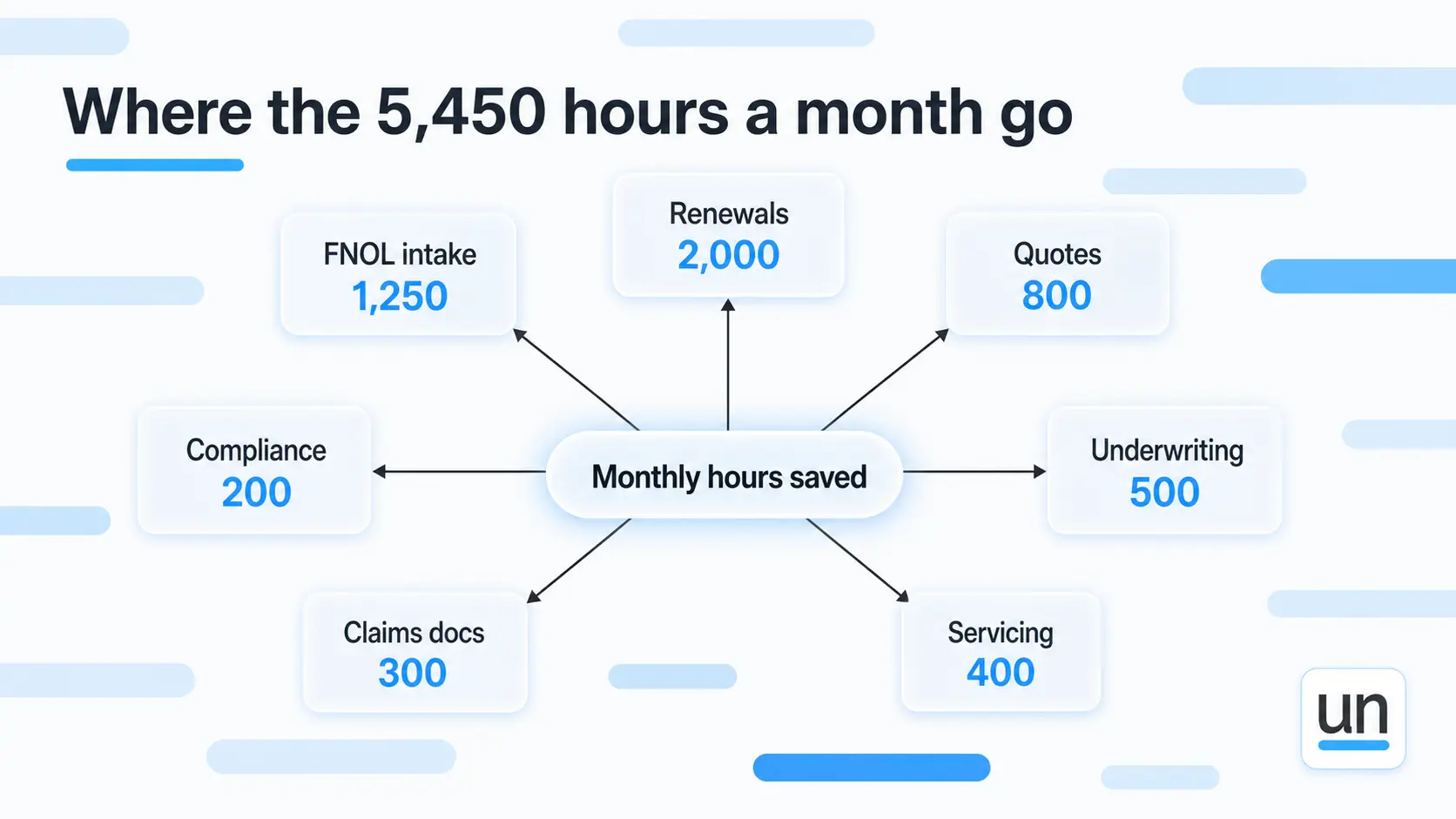
Below is a table for your reference-
| Process | Monthly hours saved |
|---|---|
| FNOL intake | 1,250 |
| Renewals | 2,000 |
| Quotes | 800 |
| Underwriting | 500 |
| Servicing | 400 |
| Claims docs | 300 |
| Compliance | 200 |
| Total | 5,450 hours |
4. How to Start Your Insurance Workflow Automation Initiative Without Overwhelming Your Team
Do not try to automate all seven at once. Pick one process, get it running, prove the return, and use that win to fund the next.
Most teams start with FNOL or renewals because the volume is high and the rules are clear. Results tend to show up in six to eight weeks, and that early proof is what builds momentum and budget for everything after.
Before you automate anything, map how the process runs today. Look for:
- Where people wait on someone else to move the file forward
- Where errors slip in because data is being typed instead of pulled
- Where the same question gets answered the same way a hundred times a week
Those friction points are your insurance workflow automation opportunities, and they are usually easy to spot once you follow one case from start to finish.
That mapping exercise alone tends to change how teams think about the work. What looks like a people problem on the surface almost always turns out to be a process that was never designed to scale.
5. How Insurance Automation Fits Into the Tech Stack You Already Have
You already run a core system, probably several. None of that needs to go.
| System | What it does | What automation adds |
|---|---|---|
| Policy administration system | Manages policies, renewals, endorsements | Auto updates from intake, renewals, and servicing workflows |
| Claims platform | Tracks and processes claims | Receives structured, validated data the moment a claim comes in |
| CRM | Manages customer relationships and communications | Gets updated automatically as customers move through workflows |
Insurance automation processes sit around your existing systems and handle the connective tissue between them. The gaps your staff currently fill by hand:
- Capturing input from any channel
- Validating it against your rules
- Routing it to the right place
- Updating your core systems as it moves
This is also where RPA for insurance has grown up. It used to mean a bot clicking through screens the way a person would. Now it means workflows that coordinate across systems, move data where it needs to go, and trigger the next action without anyone involved.
The result is that your team stops being the bridge between your tools and starts doing the work those tools were never built to handle.
6. The Real Barriers to Adoption and Why None of Them Are Dealbreakers
Most teams hesitate over three things, and none of them hold up once you look closely.
- Cost: A good automation platform is a real expense, but the labor it removes almost always costs more than the platform itself. ROI on FNOL and renewals alone typically lands inside three to six months.
- Integration complexity: Most platforms connect through APIs or direct connectors. It takes planning, not a rebuild.
- Staff resistance: It tends to disappear the first week someone stops handling 200 identical inquiries a day. People genuinely like their work more when the boring part is gone.
The teams that move past these three tend to have one thing in common. They picked one process, proved it worked, and let the numbers make the case for everything after. Insurance digital transformation does not have to start big to finish that way.
If you want to see how this works in a financial services context, our page on fraud detection workflow automation is worth a read.
7. How Unmeshed Fits Into Your Insurance Workflow
Here is where I want to be precise, because most automation pitches overpromise. Unmeshed is not a magic box that runs your entire operation for you. It is the orchestration layer that sits between AI and production and decides, step by step, what actually needs a model and what does not.
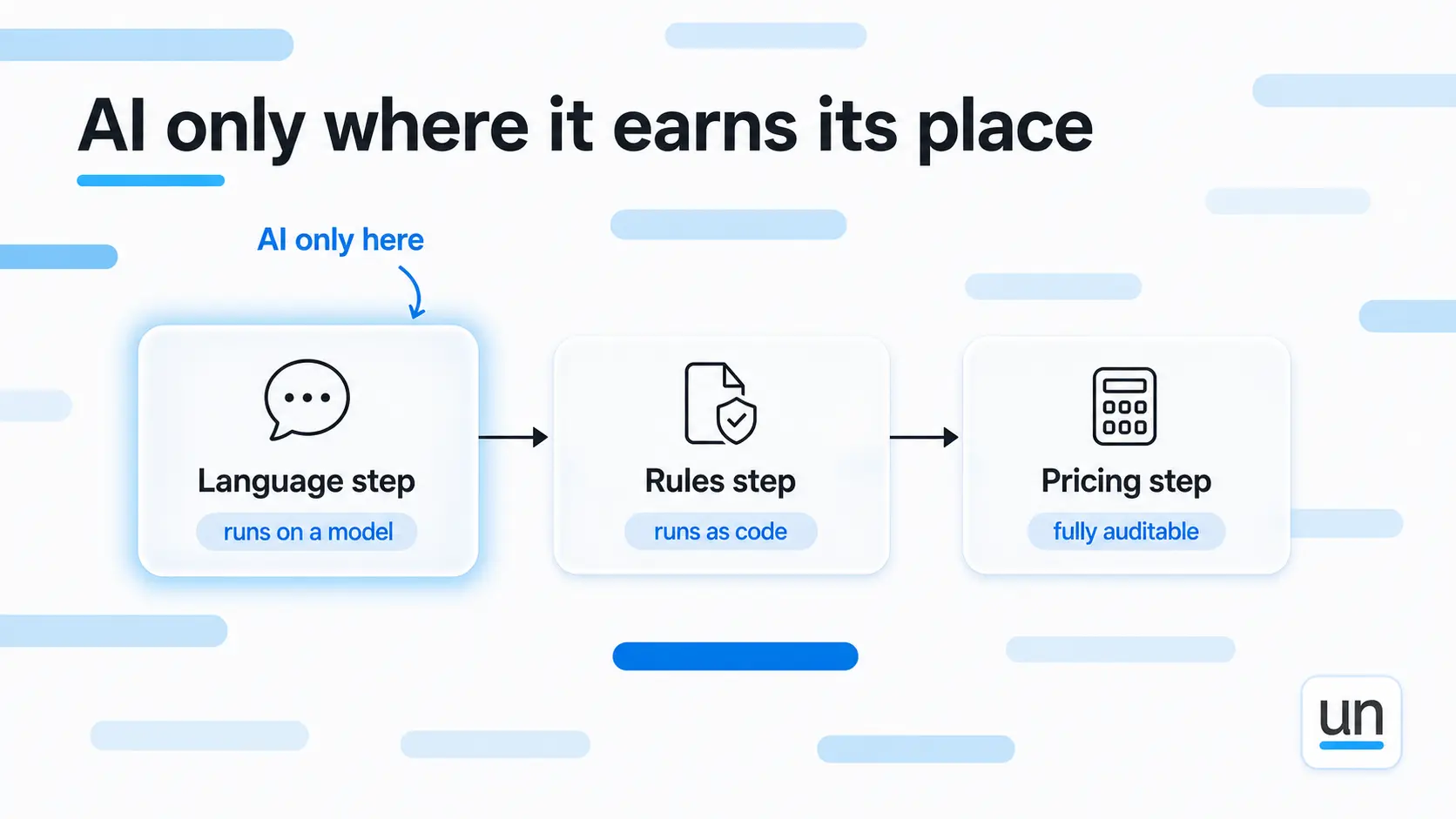
That distinction is the whole point. In a typical underwriting workflow, only a handful of steps genuinely need AI, the ones involving language or real judgment. The rest run better as plain code, rules, and API calls, which are cheaper, faster, and completely reproducible. Unmeshed runs each step on whichever of those makes sense, which is what keeps cost down and keeps every decision auditable for regulators like NAIC and NYDFS.
Here is what that looks like in practice:
- AI only where it earns its place: Judgment- and language-heavy steps run on a model. Everything else runs as deterministic code, so you are not paying a premium to process work that never needed intelligence.
- Auditable by design: Because pricing and rules run as logged, reproducible code rather than opaque model guesses, every decision can be explained and defended when a regulator asks.
- Humans stay on the calls that matter: Standard cases move through automatically while complex ones route to a senior person, who reviews the summary and makes the final decision.
The results back this up. Hiscox cut underwriting time from 72 hours to 180 seconds with no drop in decision quality.
It plugs into the systems you already run rather than replacing them, and workflows tend to go live in weeks rather than quarters.
The Bottom Line
You do not have to automate everything to see a difference. Start with these seven insurance workflow automation processes, since they carry the most volume and the fastest return.
Customers get quicker answers, your staff gets work worth doing, regulators get cleaner compliance, and you free up the budget that funds whatever comes next.
Pick one process, automate it, measure it, and prove it works. Then move to the next one. If you want help finding where the cost actually hides in your workflows, that is exactly the kind of problem Unmeshed was built to map.
Frequently Asked Questions
Sources
Your manual processes are expensive. Just saying.
Stop wasting thousands on manual insurance processes
You built insurance workflows that work. Now they are burning staff hours you can't account for. Unmeshed brings your FNOL, renewals, quotes, and servicing into one place, so you control spend rather than react to it.