
Hey, have you seen those heaven gateway memes?

An LLM gateway is kind of the same thing, except instead of deciding who gets into heaven, it decides which LLM provider handles your request, who gets turned away when rate limits hit, and who the fallback is when your first choice is having a bad day.
Most teams building AI in production end up needing one sooner or later, usually after they have written enough provider-specific code to realize they accidentally built a worse version of it themselves.
This post breaks down how an LLM gateway actually works and when you need one.
1. What Is an LLM Gateway?
An LLM gateway is middleware that sits between your application and the LLM providers you use. Your app sends a request to the gateway, and the gateway decides where it goes, which provider handles it, what format the request should be in, and what happens if something goes wrong.
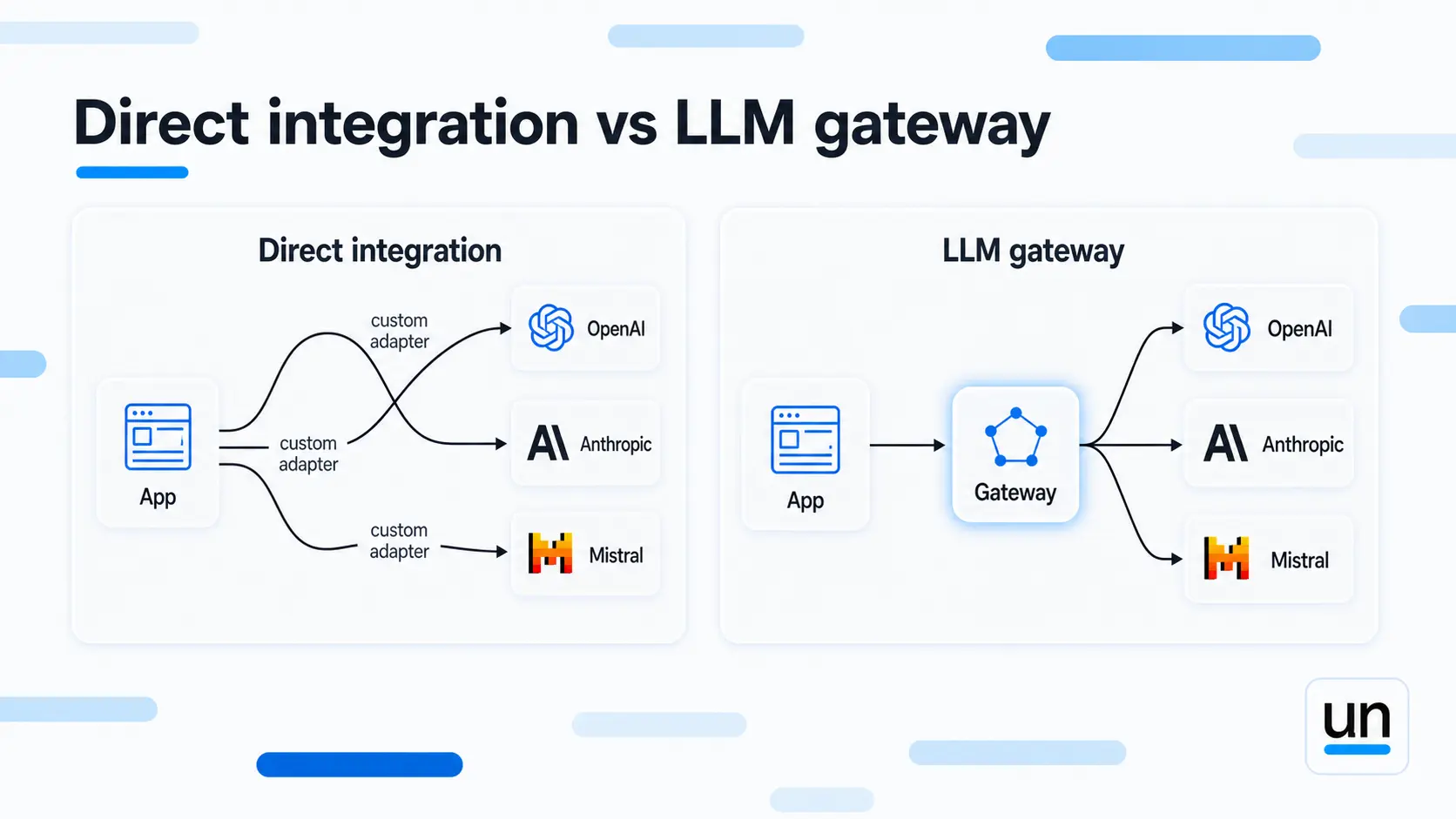
Without one, your app talks directly to each provider. OpenAI returns responses one way. Anthropic returns them another. Mistral does its own thing. You end up writing adapters for all of them, and maintaining those adapters every time a provider changes their API (which they do, often and without much warning).
The market for this infrastructure is growing fast. The LLM middleware gateway market is projected to grow at a 49.6% CAGR through 2034, and roughly 42% of enterprises already use a middleware layer to manage their AI infrastructure.
"The real cost of managing multiple LLM providers is not the API bills. It is the engineering time spent writing glue code that has nothing to do with your actual product." Andrej Karpathy, former OpenAI
An LLM gateway abstracts all of that away. One API in, one consistent response format out, every provider handled behind the scenes.
2. What Problems Do You Face Without an LLM Gateway?
The short answer is more than you expect, and teams usually find out the hard way. Running production AI without an LLM gateway tends to surface problems gradually, then all at once.
Vendor Lock-in
When you integrate directly with one provider, your entire system depends on them. If their prices spike, performance degrades, or they change their terms, migrating is a real engineering project.
You are not switching a config value. You are rewriting integrations.
Over 80% of enterprises are expected to deploy generative AI APIs by end of 2026, up from under 5% in 2023. Managing multiple providers without a unified layer becomes an operational problem at that scale.
API Fragmentation
Every provider defines request and response formats differently. Your code becomes:
- A custom adapter for OpenAI
- Another one for Anthropic
- Another one for Mistral
- And a prayer that none of them change their schema this quarter
Cost Opacity
Without a single point to track spend, costs scatter across provider dashboards. You cannot connect a cost spike to a specific feature or workflow. The invoice arrives, and nobody can explain the number.
If you are already running workflows in Unmeshed, you can see token usage and cost broken down at the step level. The bringing AI workflows into production without burning tokens post covers how that works.
Operational Fragmentation
Debugging, monitoring, and optimizing routing become genuinely painful when everything lives across separate integrations. You are jumping between dashboards, alert systems, and logs that were never designed to talk to each other.
3. How Does an LLM Gateway Work?
An LLM gateway is a middleware layer between your application and AI model providers like OpenAI, Anthropic, or self hosted models. Instead of integrating multiple SDKs, your application sends requests to a single API while the gateway handles routing, security, and cost tracking.
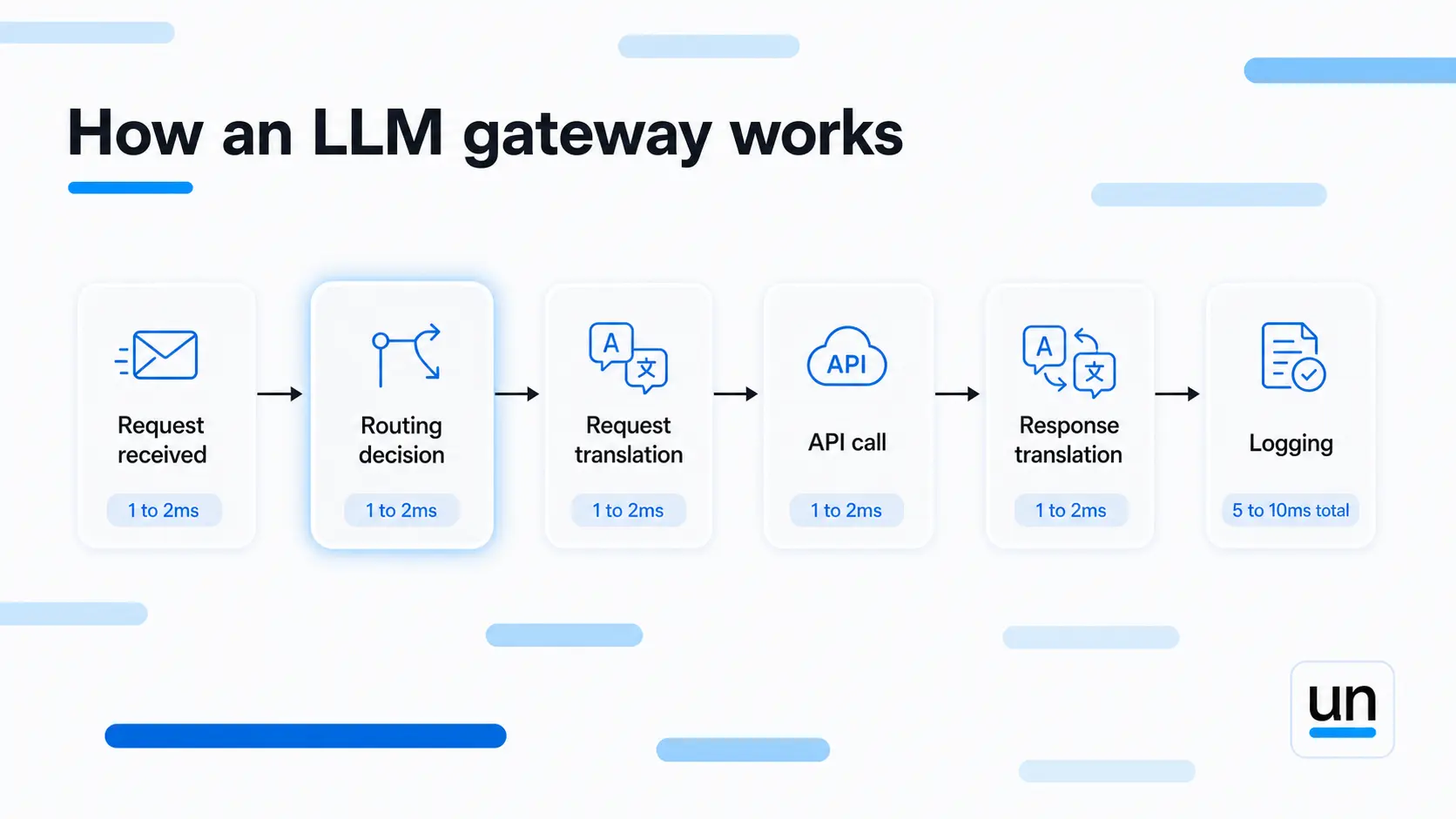
Here is what happens when your app sends a request through an LLM gateway:
| Step | What happens | Overhead |
|---|---|---|
| 1. Request received | Authentication validated, policies checked | 1 to 2ms |
| 2. Routing decision | Provider selected based on cost, latency, or custom rules | 1ms |
| 3. Request translation | Standardized request converted to provider format | 1 to 2ms |
| 4. API call | Request sent to LLM provider | Variable |
| 5. Response translation | Provider response converted to standard format | 1 to 2ms |
| 6. Logging | Tokens, costs, latency recorded | 1ms |
| Total gateway overhead | Before the model responds | 5 to 10ms (before the model responds) |
That 5 to 10ms is the cost of having complete visibility and control over every request. For most production systems, that is a very reasonable trade.
The unified LLM API gateway pattern means your application code never needs to know which provider it is talking to. You write to one interface, and the gateway handles the translation.
4. What Features Does Your LLM Gateway Need?
Not all gateways are built the same. Here is what actually matters when you are running AI in production.
Model Abstraction
Write once, route anywhere. Your application code stays the same regardless of which provider handles the request. Switch from GPT to Claude without touching your integration layer. This is what "LLM provider abstraction layer" actually means in practice.
Intelligent Routing and Load Balancing
LLM routing and load balancing is where most of the cost optimization lives. Send simple classification tasks to cheaper models. Route complex reasoning to the models that can actually handle it. Load balance across multiple instances when one is slow.
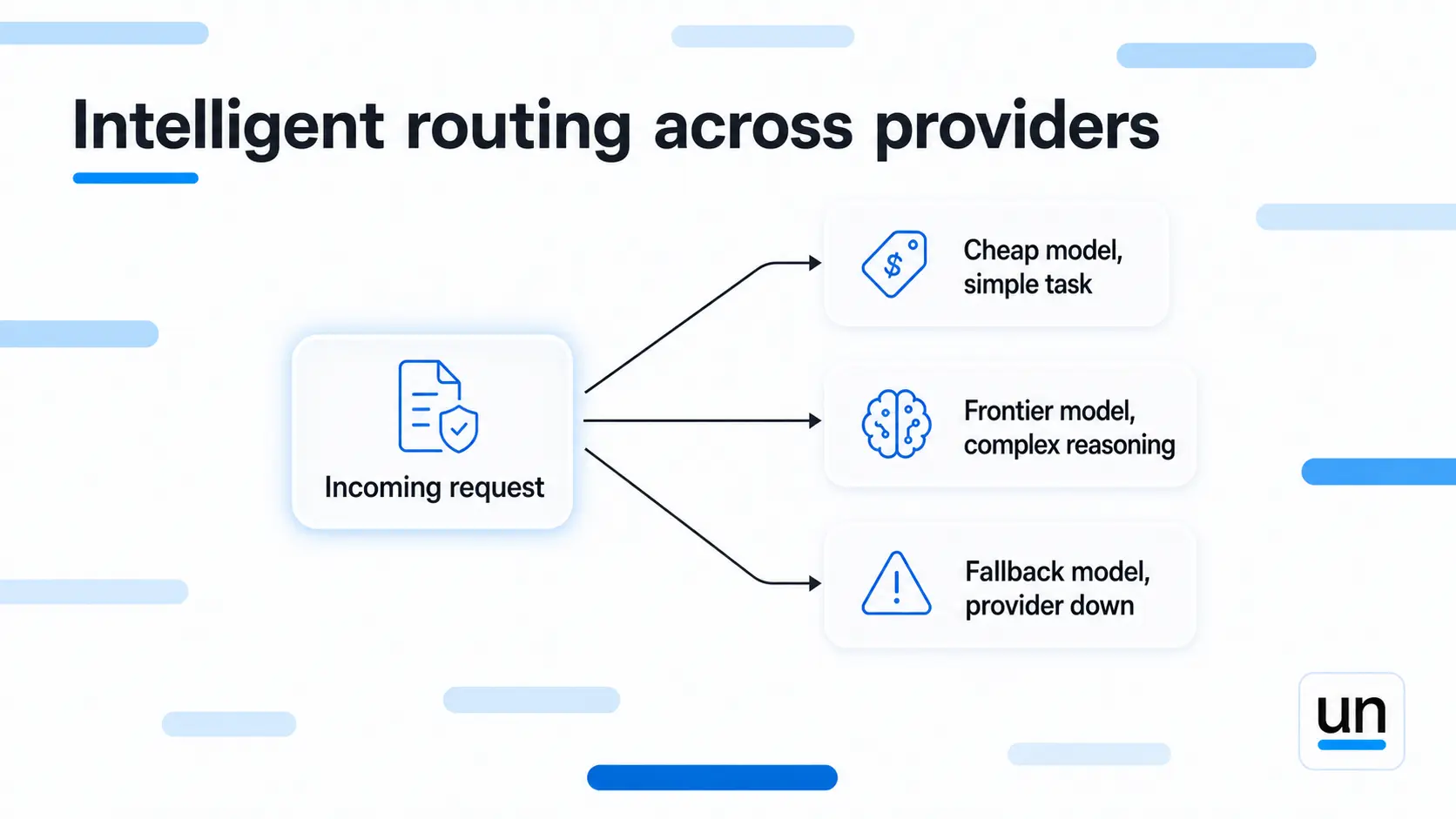
This is not a nice-to-have. At scale, smart routing is the difference between an AI bill you can explain and one that makes your finance team ask questions.
Cost Control
Set hard limits per user, team, or workflow. Track spend in real time rather than at month-end. According to Gartner, uncontrolled AI inference spend is now one of the top three budget surprises for enterprise engineering teams. A good gateway prevents that.
Failover and Fallback
If a provider goes down or hits rate limits, the gateway automatically retries with a different provider. Your application keeps running. Users never notice.
Observability
See every request, every provider, every cost in one place. Multi-model LLM orchestration only works if you can actually see what all the models are doing.
Security and Compliance
Centralized LLM cost tracking and policy enforcement beats managing security across five separate integrations. Enterprise teams need audit logs, role-based access, and data handling rules in one place.
5. LLM Gateway vs Direct API Integration
Here is the honest comparison:
| Aspect | Direct API | LLM Gateway |
|---|---|---|
| Setup | Separate integration per provider | One integration point |
| Flexibility | Hard to switch providers | Switch in configuration |
| Cost tracking | Scattered across dashboards | Centralized view |
| Security enforcement | Per integration | One place |
| Failover | Custom code every time | Built in |
| Vendor lock-in | High | Low |
| Maintenance | Grows with every provider | Stays manageable |
Direct integration works fine for a single provider at small scale. Once you are running multiple models in production, the maintenance cost of direct integration compounds fast. A gateway is not complexity for its own sake. It is complexity that replaces worse complexity.
6. When Should You Use an LLM Gateway?
There is no hard rule on when an LLM gateway becomes necessary, but here are the situations where teams reliably reach for one.
- Cost optimization is the most common driver. Route non-critical queries to cheaper models and reserve expensive ones for high-value tasks. Teams typically see 40 to 60 percent cost reduction without touching output quality. Teams that skip the gateway layer entirely tend to see token spend climb 30 to 40 percent faster than necessary.
- Multi-model applications are where gateways really earn their place. An AI assistant that uses different models for different tasks (classification on a smaller model, reasoning on a frontier one, summarization on another) needs something to coordinate all of that. That something is the gateway.
- Enterprise compliance is non-negotiable in certain industries. Banks and healthcare companies need centralized control, audit logs, and data policies enforced at the request layer. Doing that across five direct integrations is an audit nightmare.
- Provider flexibility matters for any team still figuring out which models are right for which tasks. A gateway lets you test OpenAI versus Anthropic versus open source without rewriting code every time.
- High-volume production systems handling millions of requests need load balancing, failover, and cost attribution at scale. You cannot bolt that on as an afterthought.
Unmeshed handles exactly this kind of multi-step AI orchestration natively. The Agentic AI page shows what that looks like in practice.
7. Should You Build or Buy an LLM Gateway?
The build vs buy question comes up constantly when teams are evaluating an LLM gateway, and the math is usually pretty clear once you add it up.
Building your own means supporting every provider's API as they evolve, writing routing logic, building cost tracking, implementing failover, handling security, and maintaining all of it. That is not a weekend project. That is a team of engineers maintaining infrastructure that has nothing to do with what your product actually does.
Buying means setup in hours instead of months. You get updates when providers change their APIs (and they will). You get security patches. You get operational support.
Every hour your team spends building gateway infrastructure is an hour not spent building your actual product.
The only case for building your own is if your requirements are genuinely unusual enough that nothing on the market fits. That happens, but it is rarer than teams think.
8. How Unmeshed Handles LLM Routing?
Unmeshed is not a dedicated LLM gateway, and it is worth being clear about what that means before you read this section. It is a workflow orchestration platform that covers part of what an LLM gateway does, specifically the routing and fallback piece.
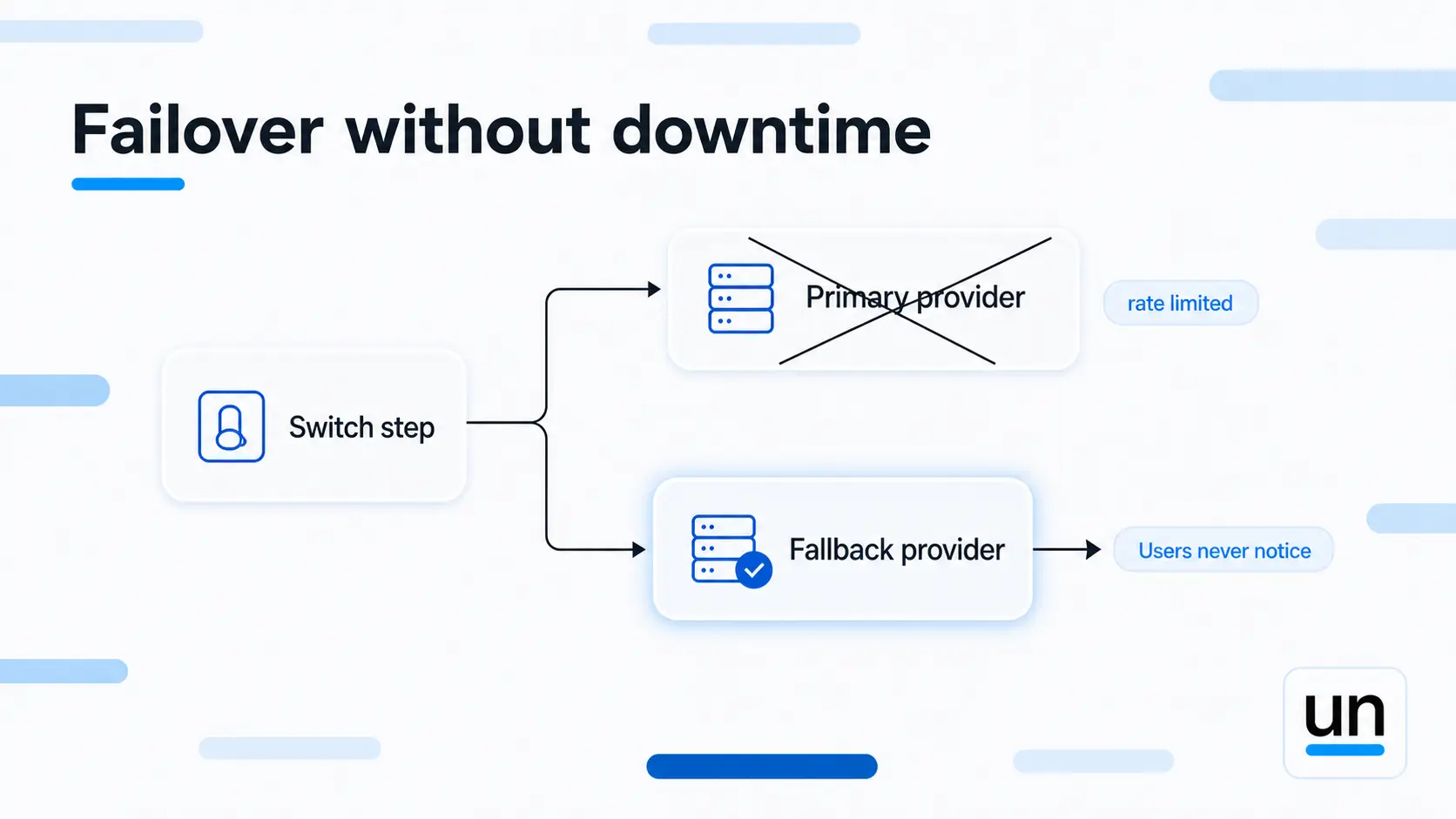
What Unmeshed does cover is the routing part of what a gateway does. Using switch steps combined with different LLM model steps, you can build routing logic directly into your workflow:
- A switch step evaluates the condition (task complexity, cost threshold, whatever makes sense for your use case)
- Each branch routes to a different LLM provider via a dedicated model step
- Fallback logic handles what happens if the primary provider fails or rate limits
If you are already orchestrating workflows in Unmeshed, you may not need a separate gateway for the routing and fallback piece. It is already there.
What Unmeshed does not replace is the full gateway layer, things like unified API abstraction across providers, PII redaction at the request level, or a single cost dashboard across all your model spend. For those, you would still want a dedicated gateway.
The combination that works well for a lot of teams is a gateway handling the provider-level concerns (format translation, rate limits, security) and Unmeshed handling the workflow-level concerns (what runs when, which steps use AI versus deterministic code, what happens when something fails).
If you want to see how Unmeshed handles routing and fallback inside a real workflow, explore the templates or start free and build your first AI workflow today.
9. What Mistakes Do Teams Make With LLM Gateways?
Teams setting up an LLM gateway for the first time tend to run into the same patterns repeatedly.
- Over-engineering the router: Simple rules outperform complex logic more often than people expect. Route based on cost or latency. Do not try to predict model performance from first principles. Let real production data drive routing decisions over time.
- Not tracking costs at the task level: Knowing your total monthly spend is not enough. You need to know cost per workflow, per feature, per user. Without that, teams optimize things that do not actually move the bill.
- Ignoring failover until something breaks: Test what happens when a provider goes down before it goes down. Your gateway should handle it automatically, and your users should never notice.
- Assuming all providers are equal: They are not. OpenAI and Anthropic have different rate limits, different response quality on different task types, different costs per token, and different reliability characteristics. Your routing logic needs to know the difference.
The Bottom Line
An LLM gateway is what sits between your application and the chaos of managing multiple LLM providers directly, and once you have used one, you will wonder how you shipped without it. It handles routing, failover, format translation, cost tracking, and policy enforcement so your application code can stay clean and your team can focus on building things that actually matter.
Most teams start without one and add it when the pain of managing direct integrations gets expensive enough. The better move is to start with one and never accumulate that pain in the first place.
Frequently Asked Questions
Sources
Still managing three provider dashboards?
Your LLM infrastructure should be invisible, not fragmented
Unmeshed puts one gateway between your app and every model provider, routes requests intelligently, and enforces policies before a single token is spent.