Pop quiz. YAY.
When did you last look at what your Claude API costs are actually coming from?
- I have a dashboard for that (genuinely impressive)
- The invoice made me look (relatable)
- What costs? It is still on the free tier (for now)
If your answer was B or C, this post was written for you.
Claude API costs have a funny way of looking completely fine until they do not, and by then you are already three invoices deep into a problem that was very fixable.
This post breaks down exactly why claude api costs compound faster than most teams expect, and seven ways to cut them without touching output quality.
1. How Claude API Pricing Works
Claude API pricing is based on tokens, not requests. You pay for every token in and every token out, and those two numbers are priced very differently.
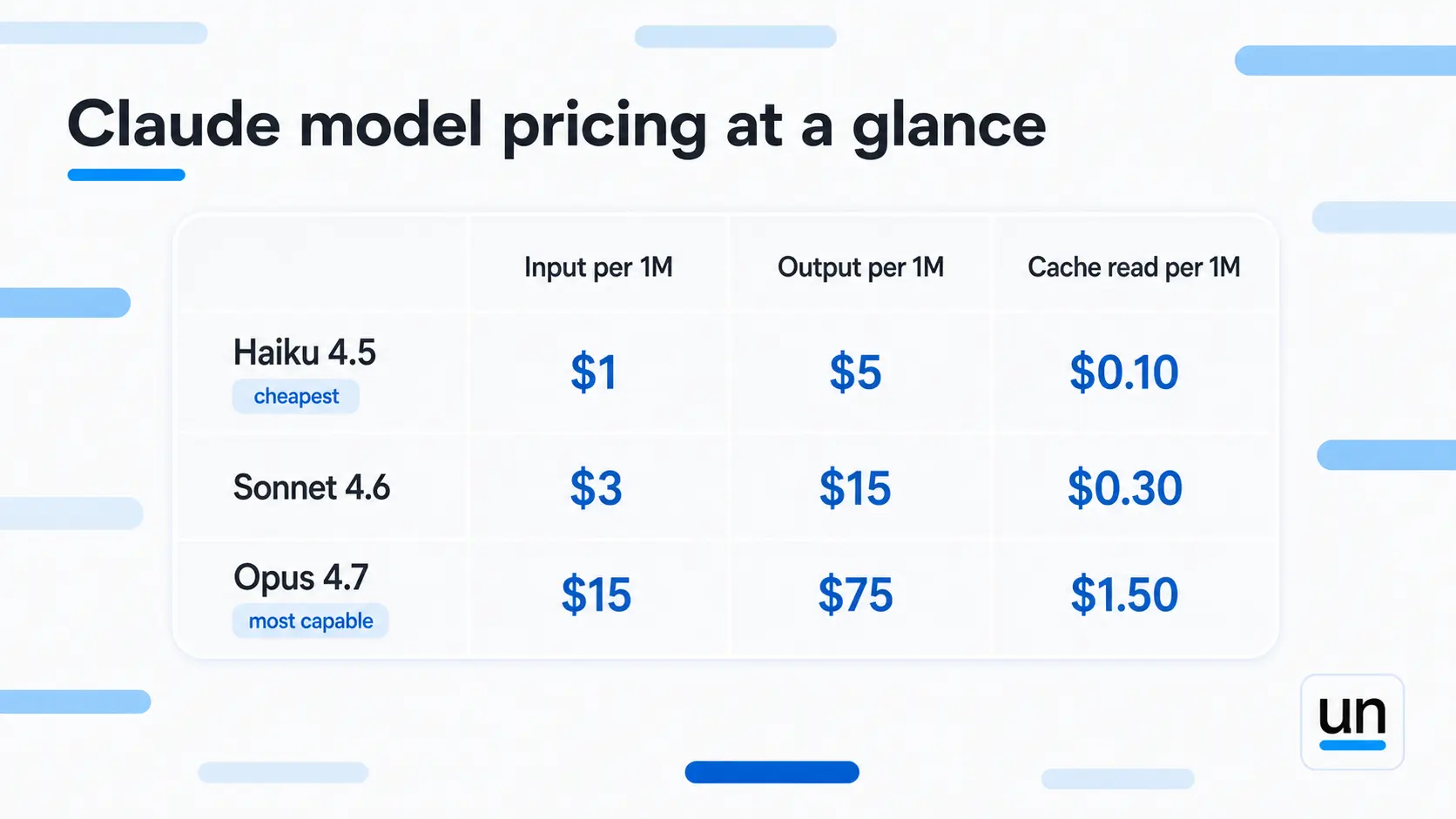
Output tokens cost five times more than input tokens across every Claude model. That one fact changes how you think about what is actually driving your anthropic claude api cost, and it is almost always the output side doing more damage than teams expect.
The average Claude Code developer spends between $150 and $250 a month according to Anthropic's own estimates, and that is before accounting for workflows that were never optimized. At production scale, unoptimized claude api costs multiply fast.
| Model | Input per 1M | Output per 1M | Cache read per 1M | Best for |
|---|---|---|---|---|
| Haiku 4.5 | $1.00 | $5.00 | $0.10 | High-volume simple tasks |
| Sonnet 4.6 | $3.00 | $15.00 | $0.30 | Production default |
| Opus 4.7 | $5.00 | $25.00 | $0.50 | Complex reasoning |
2. Why Claude API Costs Compound Faster Than You Expect
This is the insight most pricing guides skip entirely, and it is the one that actually explains why your bill looks the way it does.
Every turn in a multi-turn conversation re-sends the full conversation history. Turn 50 does not just pay for itself. It pays for turns 1 through 49 plus itself. Here is what that looks like in plain math:
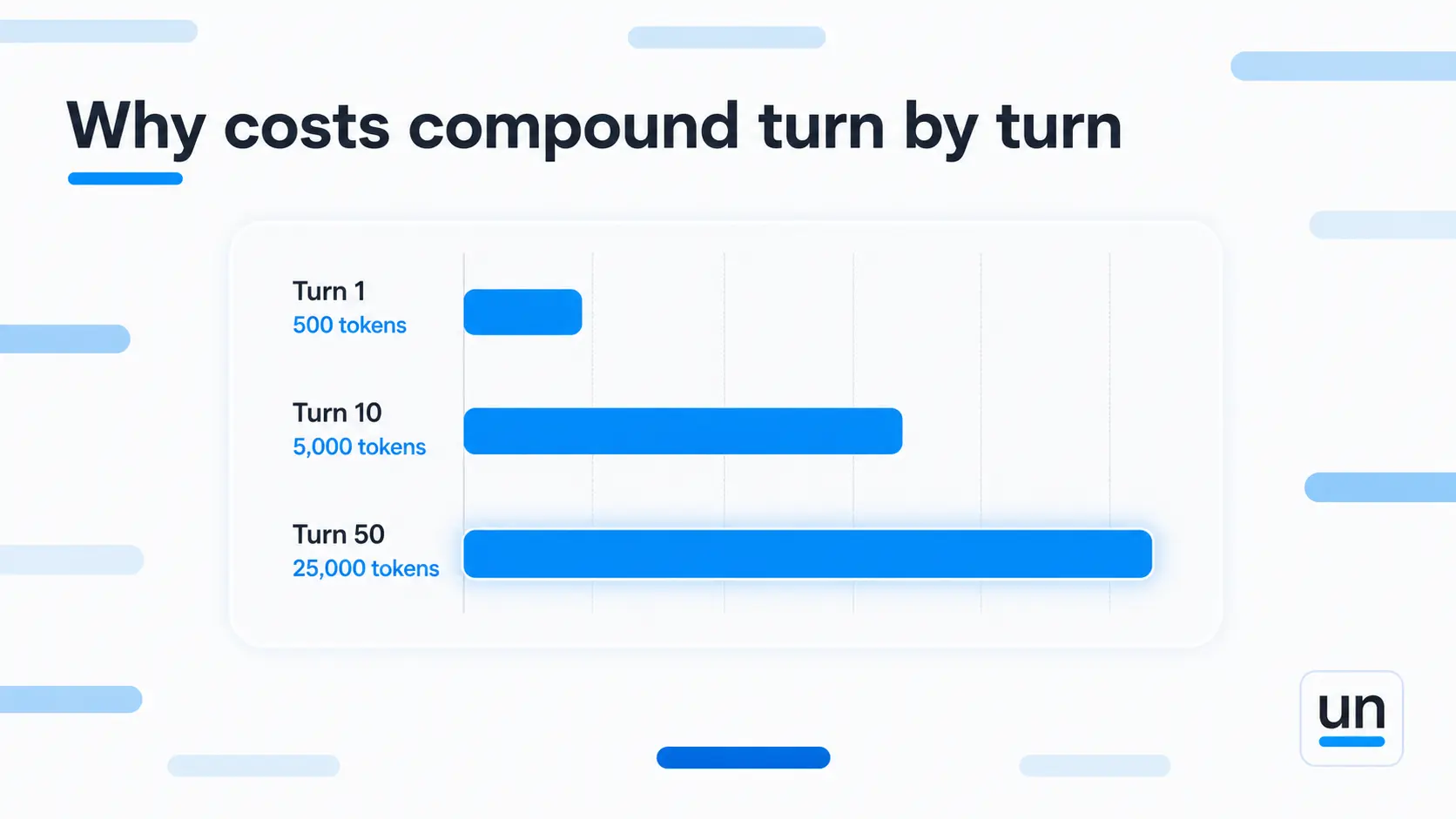
- Turn 1: 500 tokens
- Turn 10: 500 tokens of new content plus the 4,500 tokens from turns 1 through 9
- Turn 50: 500 tokens of new content plus 24,500 tokens of history
By turn 50 you are paying for 25,000 tokens on a message that added 500 words of real value. A 50-turn conversation does not cost 50x one turn. It costs dramatically more because the late turns carry the entire weight of everything before them.
This is why your claude api costs can look reasonable in testing (a few turns, low volume) and then surprise you in production (long conversations, thousands of users, history growing with every message).
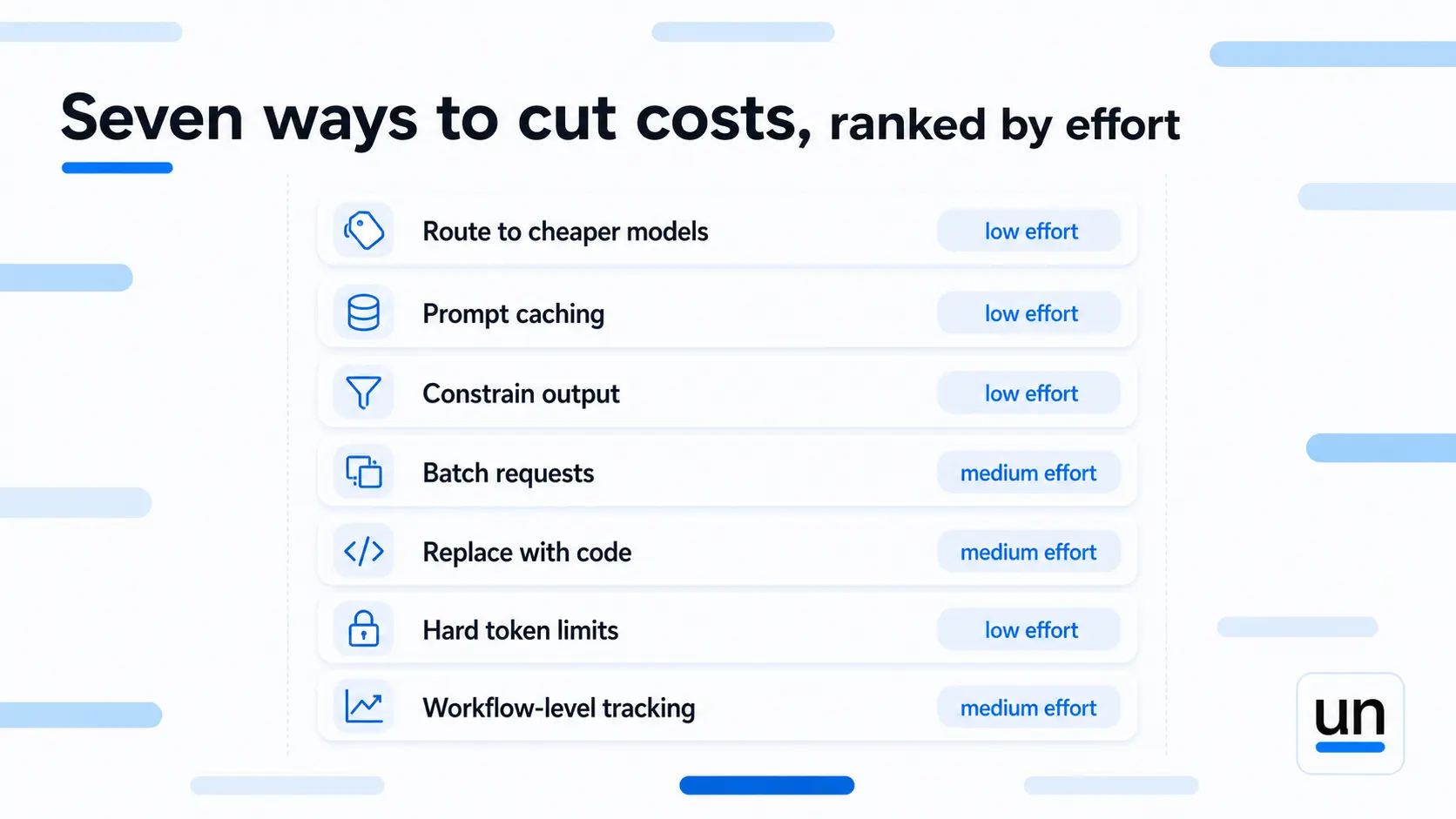
3. 7 Ways to Cut Claude API Costs Without Hurting Quality
Here are the seven highest-leverage changes, ordered roughly by how fast they pay back.
1. Route Simple Tasks to Cheaper Models
Not every task needs Opus. Model routing means sending each request to the cheapest Claude model that can actually handle it well.
Haiku 4.5 costs $1 per million input tokens. Opus 4.7 costs $5. That is a 5x swing on input alone, and on output the gap is the same. For classification, extraction, formatting, and simple rewrites, Haiku performs nearly identically to Opus at a fifth of the cost.
In a typical production workflow, 60 to 80 percent of requests are routine tasks that never needed a frontier model. Route those to Haiku and reserve Sonnet or Opus for the steps that genuinely need the reasoning depth. This single change is usually the largest lever available for cutting claude api costs.
2. Use Prompt Caching on Stable Inputs
Claude prompt caching gives you a 90 percent discount on cache reads for repeated input prefixes, typically your system prompt.
A 3,000-token system prompt sent across 200 daily calls:
- Without caching: 200 x 3,000 x $3.00 per million = $1.80 per day
- With caching: First call at full price, subsequent cache reads at $0.30 per million = roughly $0.19 per day
That is a 90 percent reduction on that one input block, from one configuration change. Claude Code applies prompt caching automatically. For everything else, you need to set it up deliberately, and most teams never do.
If you want to understand how token-level costs compound before you even touch caching, our post on what is token efficiency breaks that down clearly.
3. Constrain Output Length
Output tokens cost five times more than input tokens. This is worth repeating because most teams focus on prompt length and ignore output constraints entirely.
If your downstream code reads one field, do not ask Claude to return a formatted report with reasoning. "Return only the category name, nothing else" is a valid instruction; it works, and it eliminates four times the tokens at five times the price.
Before: "Classify this support ticket and explain your reasoning in detail." After: "Return only the category: billing, technical, or general."
Same information. Fraction of the output tokens. The savings stack up fast at production volume.
4. Batch Non-Urgent Requests
The Claude Batch API processes requests asynchronously and costs 50 percent less than standard calls.
Anything that does not need a real-time answer qualifies. Overnight document processing, bulk classification runs, data enrichment, report generation, email drafts queued for morning. If a task can wait a few hours, batching it is a one-parameter change that halves the claude api pricing for that workload.
Real-time chat and anything a user is actively waiting on stays on standard calls. Everything else is worth a second look.
5. Replace LLM Calls With Code Where Possible
This is the technique none of the competitors cover, and it is the one with the highest ceiling.
Not every step in a workflow needs a language model. Routing a request based on a keyword, extracting a date from a structured string, validating whether a field is formatted correctly, checking if a value falls within a range. All of these run as plain deterministic code at zero token cost.
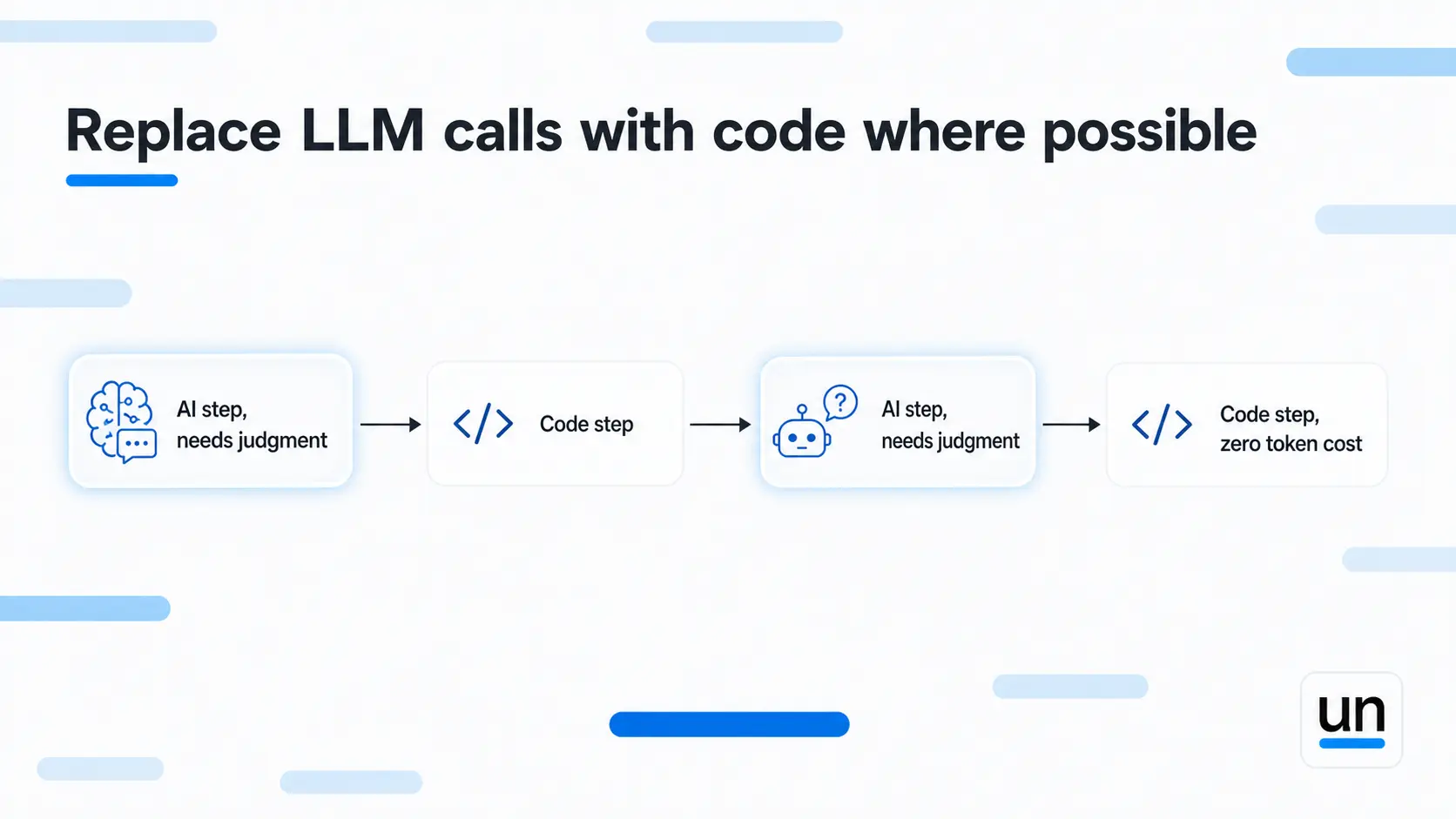
Teams reach for Claude because it is right there and it is easy, not because the task actually needs language understanding.
Every step you move from a model call to a function removes that cost permanently rather than just reducing it.
A regular expression pulls a date from a string in milliseconds, for free, the same way every time. Handing that job to Claude costs tokens and occasionally produces creative interpretations of the date format.
Replacing LLM calls with code is how you reduce claude api costs structurally, not just optimise around them.
6. Set Hard Token Limits Per Step
A maximum token ceiling on every AI step is the simplest guardrail you can add, and most teams skip it entirely.
When a model loops on itself or an agent workflow goes off track, it keeps generating tokens until something stops it. Without a ceiling, that something is your invoice. With a ceiling, the step hits the limit and stops instead of quietly running up a bill nobody planned for.
This will not lower your normal spend. What it does is protect you from the outliers, runaway agent loops, unexpectedly verbose responses, edge cases that generate ten times the expected output. At scale, those outliers add up.
7. Track Claude API Costs at the Workflow Level
A monthly total tells you what you spent. It tells you nothing about which workflow, which step, or which prompt caused it.
Workflow-level tracking is what turns a confusing invoice into something actionable. You see which workflow is driving spend, which ones earn their cost, and which ones are generating noise. You cannot cut what you cannot see, and aggregate monthly numbers never show you where the real problem is.
This is also the foundation that makes every other technique on this list measurable. Without step-level cost data, you are optimizing blind.
4. The Claude API Cost Reduction Stack
Here is how the seven techniques compare on effort and typical savings for cutting claude api costs.
| Technique | Effort | Typical savings | Best for |
|---|---|---|---|
| Route to cheaper models | Medium | 40 to 80% | Multi-step pipelines |
| Prompt caching | Low | Up to 90% on repeated input | Stable system prompts |
| Constrain output | Low | 30 to 60% | Structured outputs |
| Batch requests | Low | 50% | Non-urgent workloads |
| Replace with code | Medium | 100% on replaced steps | Routing, parsing, validation |
| Hard token limits | Low | Prevents runaway spend | Agentic workflows |
| Workflow-level tracking | Medium | Enables everything else | All production systems |
Start with the low-effort rows. Each one is a proven LLM cost optimization technique that works independently. Prompt caching, output constraints, and batch processing are all configuration changes that pay back immediately. Once those are in place, tackle the structural changes like model routing and replacing steps with code. Those take more work but save more over time because they change the shape of your spend rather than just trimming it.
5. How Unmeshed Helps You Control Claude API Costs
Unmeshed is a workflow orchestration platform. It is not a billing dashboard, but it controls what gets to spend tokens in the first place, which is where the real leverage on claude api costs sits.
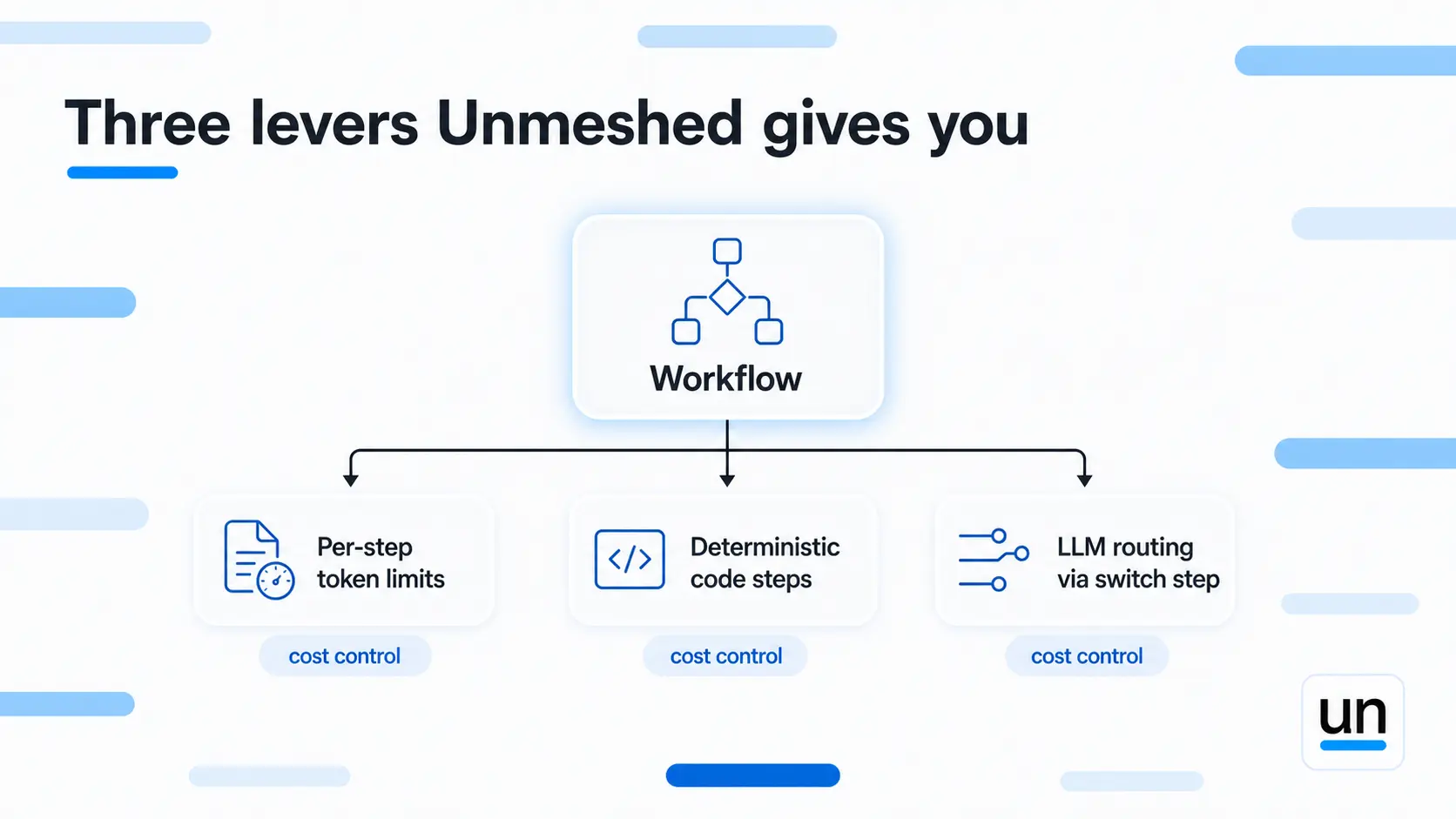
Here is what that looks like in practice:
- Per-step token limits: Every AI LLM step in your workflow has a configurable token ceiling. When a step hits that limit, it stops, so no single task can run up your claude api costs through runaway generation or unexpected loops.
- Deterministic steps where AI is not needed: Routing, parsing, validation, and field extraction run as JavaScript, Python, or JQ steps at zero token cost. You only pay for the steps where Claude actually earns its place.
- LLM routing via switch steps: Combine a switch step with different LLM model steps per condition, and you have model routing built directly into your workflow. Route simple tasks to Haiku, complex ones to Sonnet or Opus, with fallback logic if a provider fails.
The goal is not to use fewer tokens everywhere. It is to use Claude only where it adds real value and replace everything else with code that runs for free. That is how claude api costs become predictable instead of just growing with usage.
The Agentic AI page shows how AI steps sit inside production workflows and what step-level execution looks like in practice.
If you are ready to build, start free, and your first workflow has all of this built in from day one.
The Bottom Line
Claude api costs are a workflow problem as much as a pricing problem. The models keep getting cheaper, and the bills keep going up because usage grows faster than efficiency does, and nobody goes back to optimise what was built in the sprint.
Fix the system prompt. Cache the stable inputs. Route simple tasks to cheaper models. Replace the steps that never needed AI in the first place. Set ceilings before something runs away. Track spend where it actually happens.
Do those things and your claude api costs stop being a surprise at the end of the month and start being something you can explain and control.
Frequently Asked Questions
Sources
Overpaying for Claude is a workflow problem
Fix the workflow. Fix the bill.
Unmeshed replaces unnecessary LLM calls with code, enforces token limits per step, and routes requests so you only pay for what actually needs a model.