TLDR
- MCP is one shared standard that lets AI apps connect to tools and data, like one power socket that works in every hotel room.
- It has three parts. A host is the AI app, a client is its connection, and a server exposes the tools.
- The post walks through ten documented uses, from Figma to code and Postgres to browser control.
- Its advantages are build once and connect anywhere, and the limits are security and a spec that keeps changing.
- Unmeshed adds the production layer, with workflows published as MCP tools and one gateway for auth, retries, and audit.
So, what is MCP used for? If you've been nodding along every time someone says "MCP" in a meeting, this one's for you.
Here's the short answer to what MCP is used for. MCP is a standard way for AI apps to connect to the tools and data they need. People talk about it constantly. Far fewer can name one thing they've actually done with it.
We're going to fix that.
Below are ten examples, and each one names the actual server or app involved so that you can try it yourself. We'll also be upfront that these are documented examples from the MCP docs and Anthropic's announcements, not customer case studies. We haven't run all ten ourselves, and we won't pretend we did.
And we'll tell you where Unmeshed fits, and where it doesn't.
Okay, let's get into it.
1. What Is MCP Used For?
MCP is used to connect AI apps to the tools and data they need to do actual work. That means reading a calendar, querying a database, pulling code from a repo, or running a workflow, all through one shared standard instead of a custom integration for each.
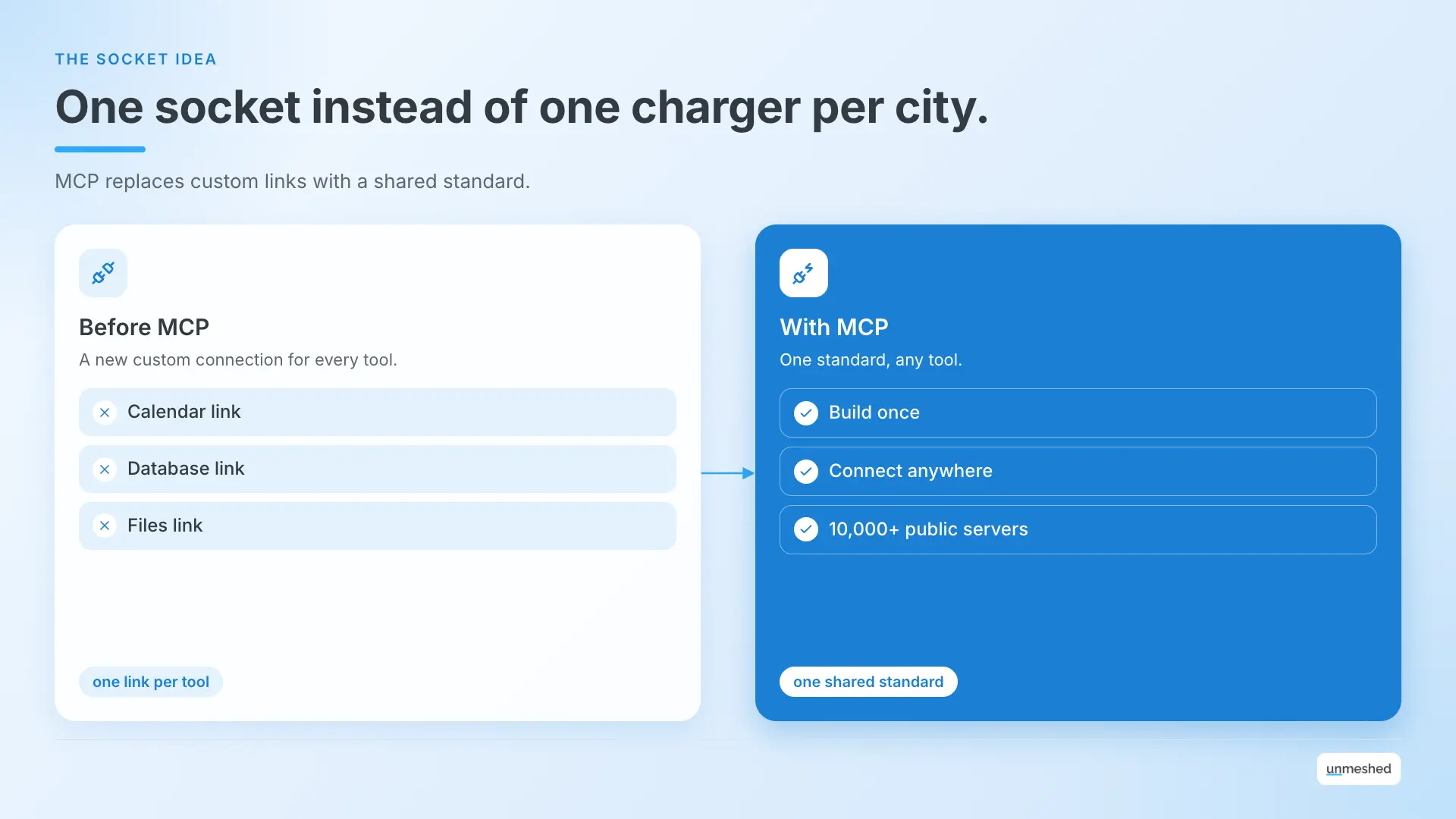
Think of a hotel where every room has the same kind of power socket. You don't pack a different charger for each city. You bring one adapter and everything just works. MCP is that socket for AI apps.
Before it existed, every new tool meant a new custom connection. If you wanted your assistant to read your files, then your calendar, then your database, someone had to build each link by hand.
Anthropic open-sourced MCP in November 2024 to replace that mess with one standard. In December 2025, it donated the project to the Linux Foundation's Agentic AI Foundation, so no single company owns it.
The official docs call it a USB-C port for AI apps, which works too. So, what is MCP used for in plain terms? It lets an AI app go from talking about your work to actually touching it. If you want the agent side of things, our guide to agentic orchestration covers it.
2. How Does MCP Work in Plain English?
MCP works with three parts. A host is the AI app you use, a client is the connection it opens, and a server is the program that exposes tools, data, and prompts. The host asks the server what it can do, then calls those tools when needed.
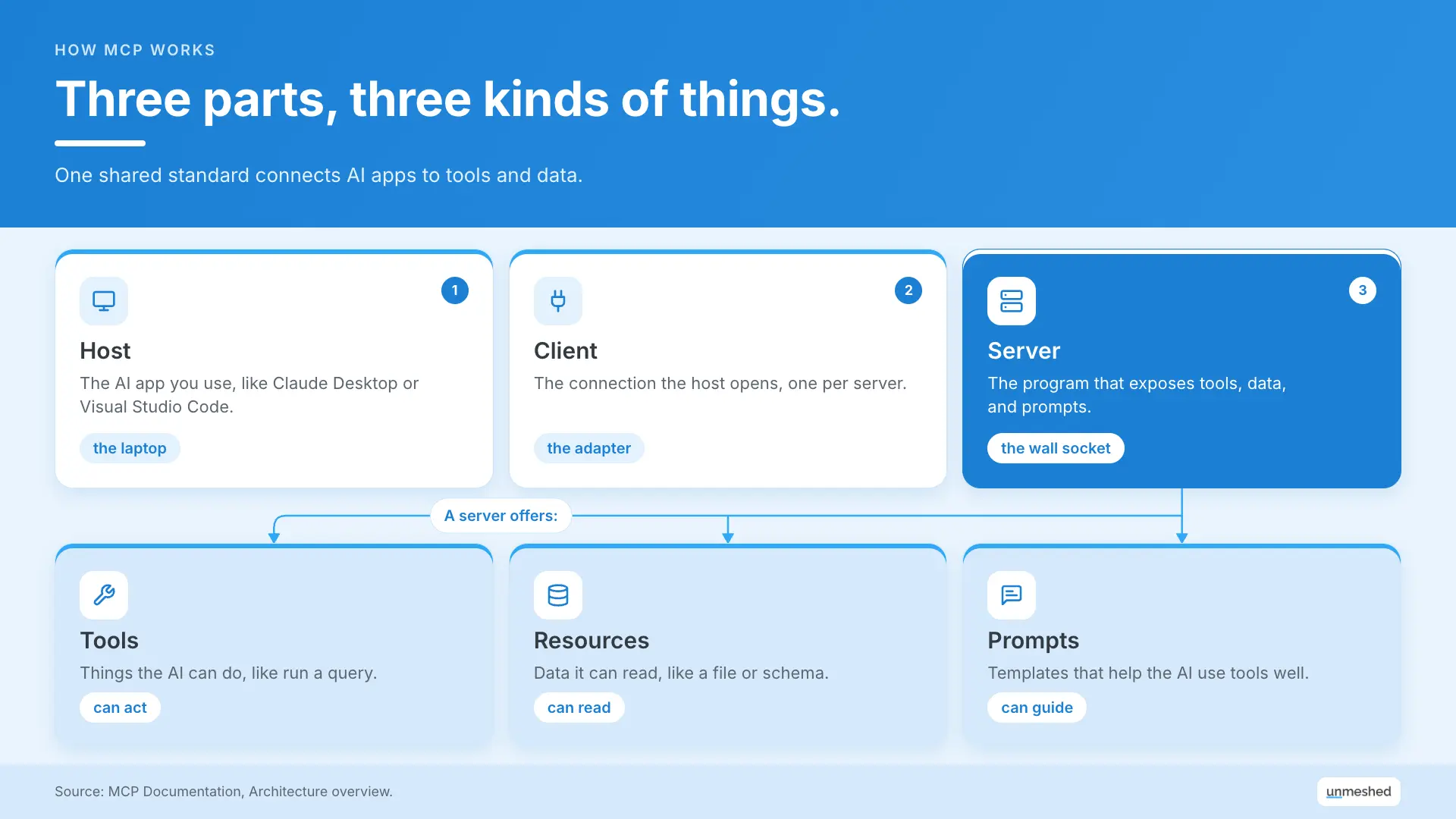
Back to the hotel for a sec. The host is your laptop, the client is the adapter you plug in, and the server is the wall socket with whatever's behind it.
| Part | What It Is | Example |
|---|---|---|
| Host | The AI app you use | Claude Desktop, Visual Studio Code |
| Client | The connection the host opens, one per server | Created by the host for you |
| Server | The program that exposes tools, data, and prompts | The filesystem server, Sentry's server |
A server can offer three kinds of things.
- Tools: Things the AI can do, like run a query or send a message.
- Resources: Data it can read, like a file or a database schema.
- Prompts: Reusable templates that help the AI use the tools well.
The docs give a nice example. A database server might offer a tool for running queries, a resource that holds the schema, and a prompt with sample questions. Same server, three jobs. You can read the full breakdown in the architecture docs.
Servers also come in two flavors. Local ones run on your own machine and talk over stdio. Remote ones run somewhere else and talk over HTTP. The filesystem server is local, and Sentry's is remote.
Once you know the parts, what is MCP used for with them? Ten things, coming right up.
One more thing worth knowing. MCP only cares about how the pieces talk to each other. It doesn't decide how your AI uses the answers.
3. What Are 10 Real MCP Use Cases?
Teams use MCP for ten main jobs, from personal assistants and design to code, to database chat, error monitoring, file access, team search, browser automation, hardware control, and publishing internal workflows as tools. Each one below names an actual server or client from the docs.
So what is MCP used for in practice? Here's the whole list in one place, then we'll go through each.
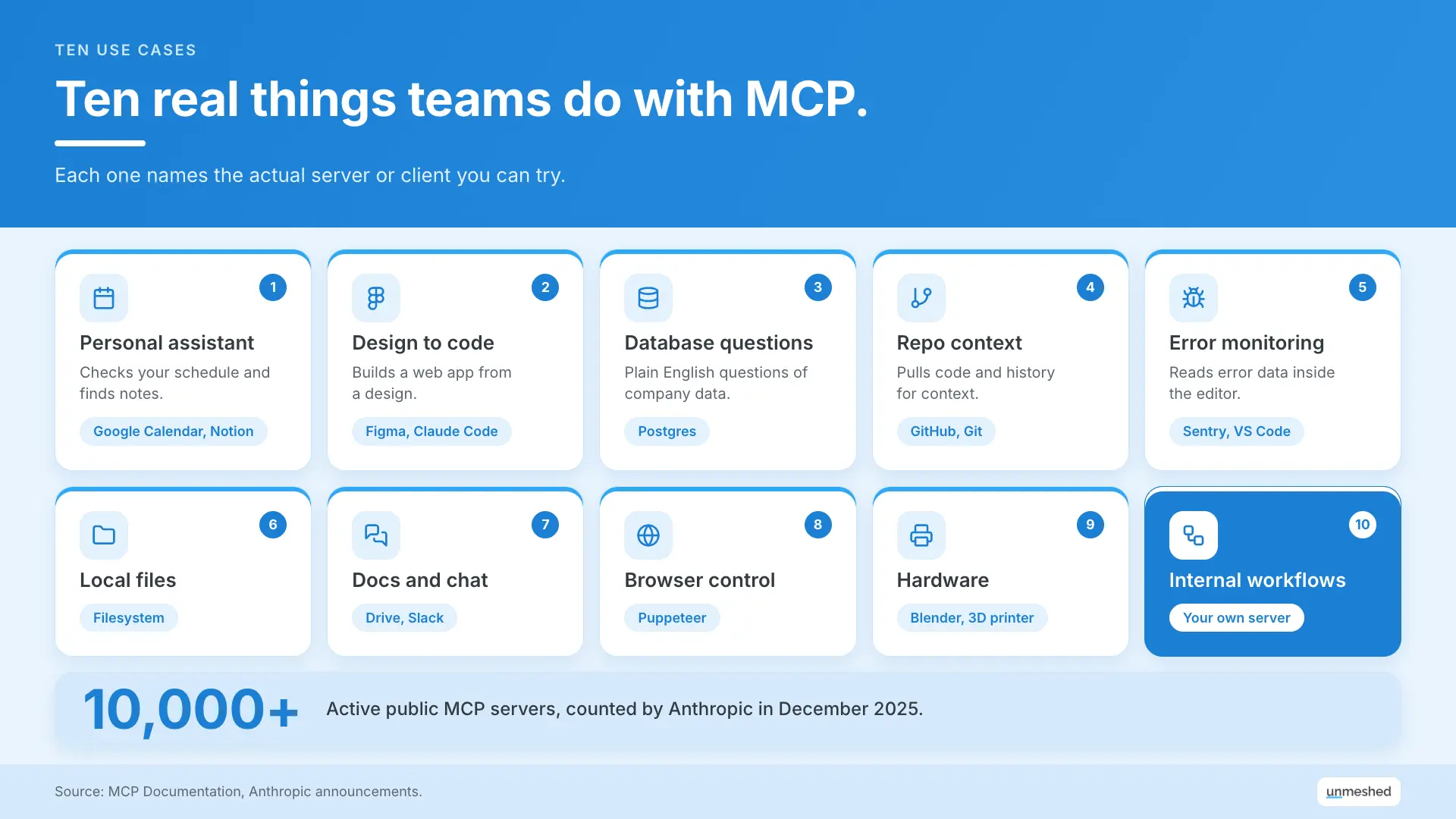
1. A Personal Assistant Over Your Calendar and Notes
Agents can read your Google Calendar and Notion through MCP servers, so an assistant can check your schedule, find a note, or help plan your week without you pasting anything in. The official MCP docs list this as a core example.
Picture asking "what does Thursday look like, and what did I write about that client?" and getting one answer. That's two servers doing the work, a calendar one and a notes one.
2. Turning a Figma Design Into Code
Claude Code can connect to Figma through MCP and generate an entire web app from a design. The official MCP docs cite this as an example of an AI tool reading from a design source directly, not from a description you typed out.
That handoff between design and code is a classic headache. With MCP, the coding tool goes to the design itself.
3. Asking Questions of Company Databases
Enterprise chatbots can connect to several databases through MCP and let people ask questions in plain English. Anthropic shipped a pre-built Postgres server at launch, and the MCP docs describe this as a core enterprise use.
So someone in ops can ask a question without waiting for an analyst to write the query. That's the pitch, anyway. Who gets access to which tables is a separate question, and we'll come back to it.
4. Giving Coding Agents Repo Context
Coding tools use MCP to pull context from repos and version control. Anthropic released pre-built GitHub and Git servers at launch, and tool makers like Zed, Replit, Codeium, and Sourcegraph said they were working with MCP to help agents understand the code around a task.
A coding agent that can only see the file you pasted is guessing. One that can look around the repo is a lot less likely to.
5. Watching Errors Without Leaving the Editor
Developers can connect Visual Studio Code to Sentry's MCP server so an assistant can reach error data without leaving the editor. The MCP architecture docs use this exact pairing to explain how hosts, clients, and servers fit together.
It's also a good example of a remote server. Sentry runs it for you, so there's nothing to install on your own machine.
6. Reading and Writing Local Files
The filesystem MCP server lets an AI app read and write files on your own machine. It runs locally over stdio, which makes it one of the simplest servers to try and a common first step for people learning MCP.
If you've never touched MCP, this is the one we'd start with. Low drama, easy to see what's happening.
7. Searching Team Docs and Chat
MCP servers for Google Drive and Slack let an assistant search shared documents and team conversations. Both were among the pre-built servers Anthropic published at launch, so they're some of the oldest and most tested examples.
Anyone who's ever scrolled Slack for ten minutes looking for a decision knows why this one is popular.
8. Driving a Browser
Puppeteer was one of the first published MCP servers, and it lets an agent drive a browser to open pages, click around, and take actions for you. It shows MCP giving an agent hands, not only eyes.
Reading a page is one thing. Clicking through it is another. That second part is where you want to be careful about what the agent is allowed to do.
9. Controlling Hardware Like a 3D Printer
MCP isn't limited to software. The official docs describe AI models creating 3D designs in Blender and printing them on a 3D printer, which shows how far a standard tool interface can stretch, even into the physical world.
It's the most fun example on the list. It also makes a good point, which is that a tool can be anything with an interface.
10. Publishing Internal Workflows as Tools
Teams can publish their own internal processes, like a refund flow, as MCP tools that agents call. This is where MCP moves from a demo to something a company relies on, and where durability and audit trails start to matter.
A refund isn't a read. It moves money. So you want it to retry safely, run once, and leave a record. We'll get to how in a bit.
That's the documented answer to what MCP is used for today, or at least the part we can point to.
4. What Is MCP and Its Advantages?
MCP's main advantages are build once and connect everywhere, less custom integration work, and a growing set of ready-made servers. A developer writes one server and any MCP client can use it. Anthropic counted more than 10,000 active public servers in December 2025.
Knowing what is MCP used for is one thing. Knowing why people bother is another, and the official docs split the benefits by who you are.
| Who | What They Get |
|---|---|
| Developers | Less time and complexity building or integrating with an AI app or agent |
| AI apps and agents | Access to a whole ecosystem of data sources, tools, and apps |
| End users | More capable apps that can use your data and act for you when needed |
There's solid adoption behind it too. ChatGPT, Cursor, Gemini, Microsoft Copilot, and Visual Studio Code all support it, according to Anthropic's announcement. When that many tools agree on one socket, building for it starts to make sense.
But it's not all upside, so here's the honest part.
- Security needs serious care: The docs have a whole security best practices page for a reason. Giving an AI a tool means giving it a way to act.
- The spec keeps moving: The current revision is dated 2026-07-28, and it deprecates a few things, like sampling. Check which version your tools speak.
- Too many tools get heavy: Loading every tool from every server upfront is wasteful, so the docs suggest progressive tool discovery for apps that connect to many servers.
5. How Do MCP AI Agents Use It in Practice?
MCP AI agents use the protocol to discover tools at runtime, choose which to call, and read the results. The agent asks a server what tools it has, then calls one with arguments. That's how an agent can use a new tool without new code.
Still wondering what is MCP used for when agents are involved? It's this loop, step by step.
- The app connects to a server and asks what it can do. That's a tools/list request.
- The AI model sees the list and decides whether any tool helps with your request.
- If so, the app calls the tool with the right arguments. That's tools/call.
- The server runs it and sends back a result, and the model uses it in its answer.
The docs use a weather lookup as the example. Ask about the weather in San Francisco, and the app calls a weather tool and hands the answer back. Same pattern for a database query or a refund. If you're wondering what keeps all of this running, our post on agent infrastructure covers the layers underneath.
One detail that surprises people. The model decides when to call a tool, but your app is the one that runs it. So the app is where you can add checks.
6. What Goes Wrong When Teams Run MCP in Production?
When teams move MCP from a laptop to production, three problems show up fast. Credentials spread across every server, nobody can see what agents called, and tool calls fail without retries. None of these are flaws in MCP. They're gaps around it.
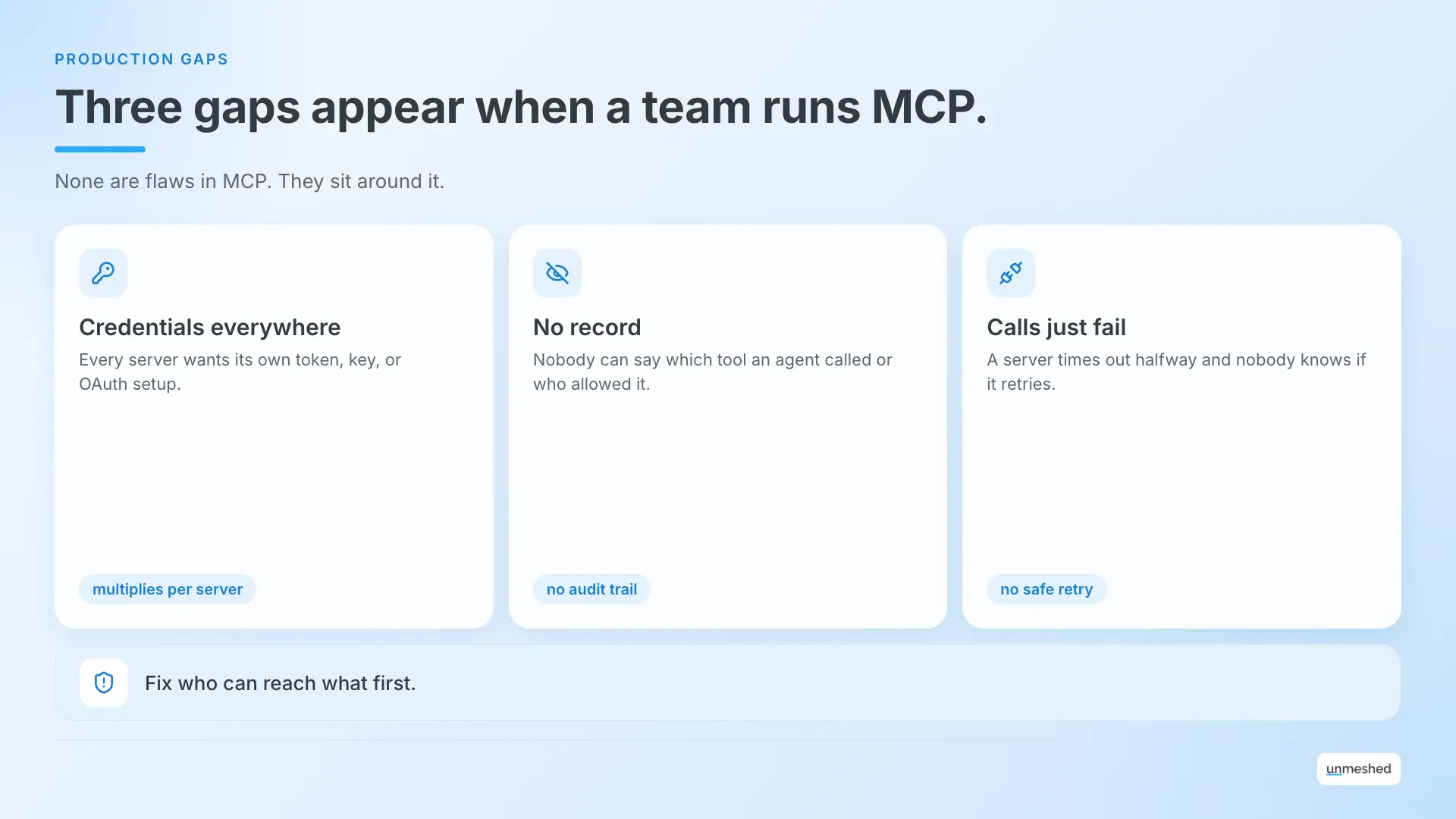
So what is MCP used for once a whole team relies on it? Everything above, plus a lot more to look after. A laptop setup is one person and a few servers. A team setup is a lot of people, a lot of servers, and a lot of agents acting on their behalf. That's a different problem.
- Credentials everywhere: Remote servers use things like bearer tokens, API keys, or OAuth, and each server wants its own. Multiply that by every server and every person, and it gets messy.
- No record of what happened: An agent called a tool. Which one, with what, and who allowed it? If nobody logged it, nobody knows.
- Calls that just fail: A server times out halfway through a task. Does it retry? Does it run twice? MCP has a Tasks extension for long-running requests, which helps, but it's about the request, not the whole process around it.
These are the same gaps we see with any agent in production, which is why we wrote about AI agent governance. Tracing what happened inside each call is its own topic too, and our guide to LLM observability goes into it. And if you're thinking about where a gateway fits, our guide to the LLM gateway covers the model side.
7. How Does Unmeshed Fit Into MCP?
Unmeshed adds the production layer around MCP. It publishes durable workflows as MCP tools your agents can call, and it puts your MCP servers behind one gateway with unified auth, observability, and durable execution. It isn't an MCP client or a model.
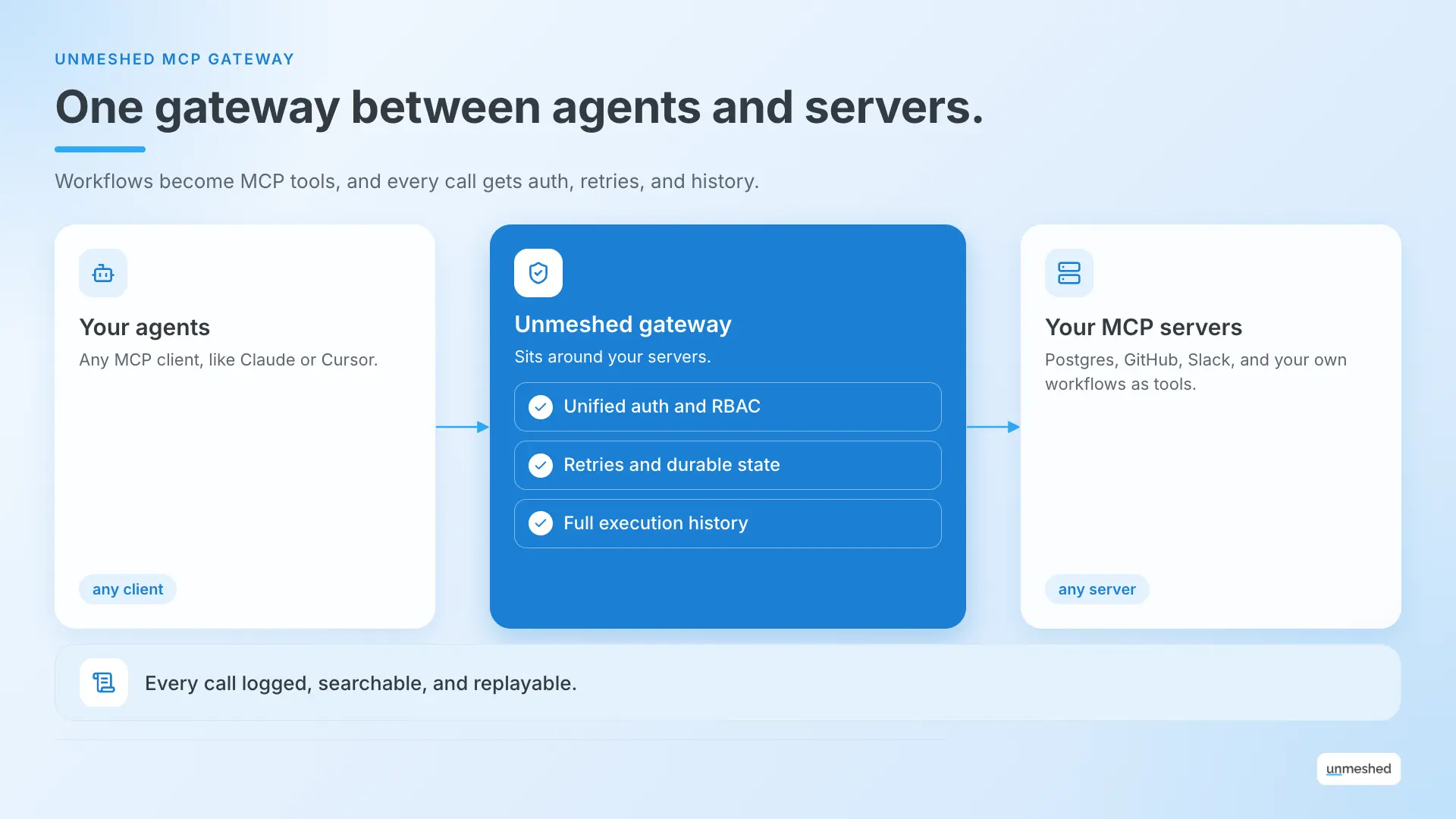
In hotel terms, MCP is the socket. We're the building's electrical system, the part that keeps the lights on and tells you where the power went.
Here's what that looks like.
- Workflows as tools: Any workflow becomes an MCP tool your agents can call, with retries, durable state, and error policies included. Our MCP gateway page has the details.
- One gateway for many servers: Put several MCP servers behind a single gateway, with unified auth and enterprise RBAC instead of per-server credentials.
- A full record: Every call leaves an execution history you can inspect, search, and replay.
It's built on durable workflows and agent orchestration, runs in the cloud or on-prem, and has SDKs for Java, Go, Python, and TypeScript.
Now the honest part. We don't replace your MCP clients or the servers you already use. We sit around them, so a tool call becomes something you can retry, limit, and audit.
Your Tool Calls Deserve A Paper Trail.
Put your MCP servers behind one Unmeshed gateway and every agent call gets auth, retries, and a full history.
Open The Gateway8. How Do You Try These MCP Examples Yourself?
Start with one server you already use, like the filesystem or GitHub server, connected to one client like Visual Studio Code or Claude Desktop. Get a single tool call working, then add servers one at a time, and add a gateway only once a team depends on it.
The fastest way to answer what MCP is used for is to try one. Here's a simple path.
- Pick one client you already use.
- Add one server. The filesystem server is the easiest, and there's a whole repository of servers to browse.
- Make one tool call and watch what happens. The official quickstart walks you through building your first server.
- Add a second server, and see how the AI picks between them.
- Only then think about sign-in and audit trails.
Don't try all ten at once. Pick the one that matches an itch you actually have, and start there.
In a Nutshell
MCP is used to give AI apps a standard way to reach tools and data, and the best way to understand it is to try one server. Start small, then add production controls once a team depends on it.
So that's what MCP is used for, in one picture. A shared socket, ten examples, and a few gaps to watch for.
Those gaps are where Unmeshed comes in. We publish your workflows as MCP tools and put your servers behind one gateway, so every agent call gets one sign-in, retries, and a full history. We don't replace your MCP clients or servers. We just make sure that when an agent calls one, you can see it, limit it, and replay it.
If you're not sure which gap is yours, look at who can reach what. That's usually where it starts.
Frequently Asked Questions
Sources
- 1.What is the Model Context Protocol (MCP)?, MCP Documentation
- 2.Architecture overview, MCP Documentation
- 3.Introducing the Model Context Protocol, Anthropic
- 4.Donating the Model Context Protocol and establishing the Agentic AI Foundation, Anthropic
- 5.Sentry MCP Server, Sentry Docs
- 6.Filesystem MCP Server, GitHub
- 7.MCP Servers Repository, GitHub
- 8.MCP Quickstart, MCP Documentation
Using MCP with more than one server?
Tell us what your agents can reach. We'll tell you what's missing.
Share which MCP servers your agents call and how they sign in. We'll point out where credentials, retries, and audit trails are slipping.