

CLI & Remote Agents
Developing Definitions with the Unmeshed CLI
Develop Unmeshed definitions in the platform UI or in local files in your project repository. The CLI keeps the two in sync so you can work in either place.
In a typical development setup, a namespace contains metadata and definitions such as:
- Process definitions
- Schedules
- Error policies
- API mappings
- API mapping webhooks
- AI agents
Organize definitions by namespace
Use a namespace to group the processes and related resources for a team, application, or project. Keep each namespace in its own project folder so you can develop and sync its definitions together.
Initialize a namespace in your project repository
Create a folder in your project for each Unmeshed namespace you want to manage. From the project root, check that the CLI is connected to the development server you intend to export from, then point update-local at the local folder and the namespace:
If the active server is wrong, use unmeshed server list to select a configured server, or unmeshed login to add and activate one. In the example, payments is the namespace on the active server and ./unmeshed/payments is its folder in your repository. The CLI creates the folder if it does not exist.
The export creates one YAML file per definition in the corresponding folder under ./unmeshed/payments/. For example:
Develop in the UI or locally
You can edit definitions in the Unmeshed UI or in your project repository. Local changes can be made manually or with AI coding agents such as Codex or Claude.
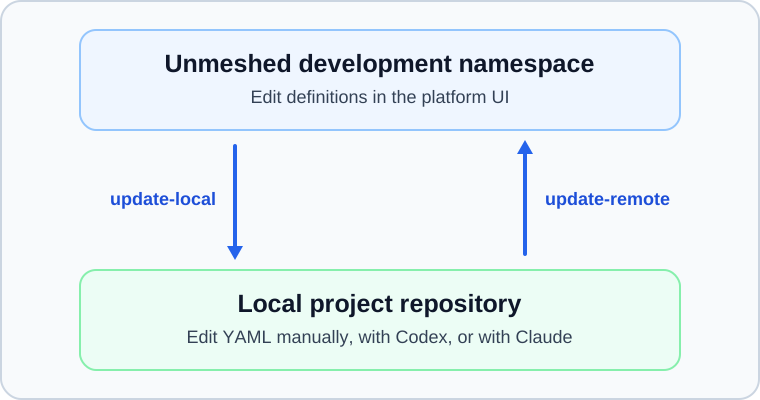
After making changes in the UI, run update-local to bring the latest definitions into your local folder. After making changes locally, run update-remote to apply those definitions to the development namespace:
Each command syncs in one direction. By default, it replaces the definitions at its destination, so choose the direction that matches where you made the latest changes.
When the definitions are ready for testing or production, see Promoting Definitions Across Environments.