

Concepts
Namespace Based Permissions
Namespace based permissions control which Namespaces a user can access in Unmeshed. This ensures users only work with the Namespaces they are authorized to use.
How It Works
- An administrator opens the Users page.
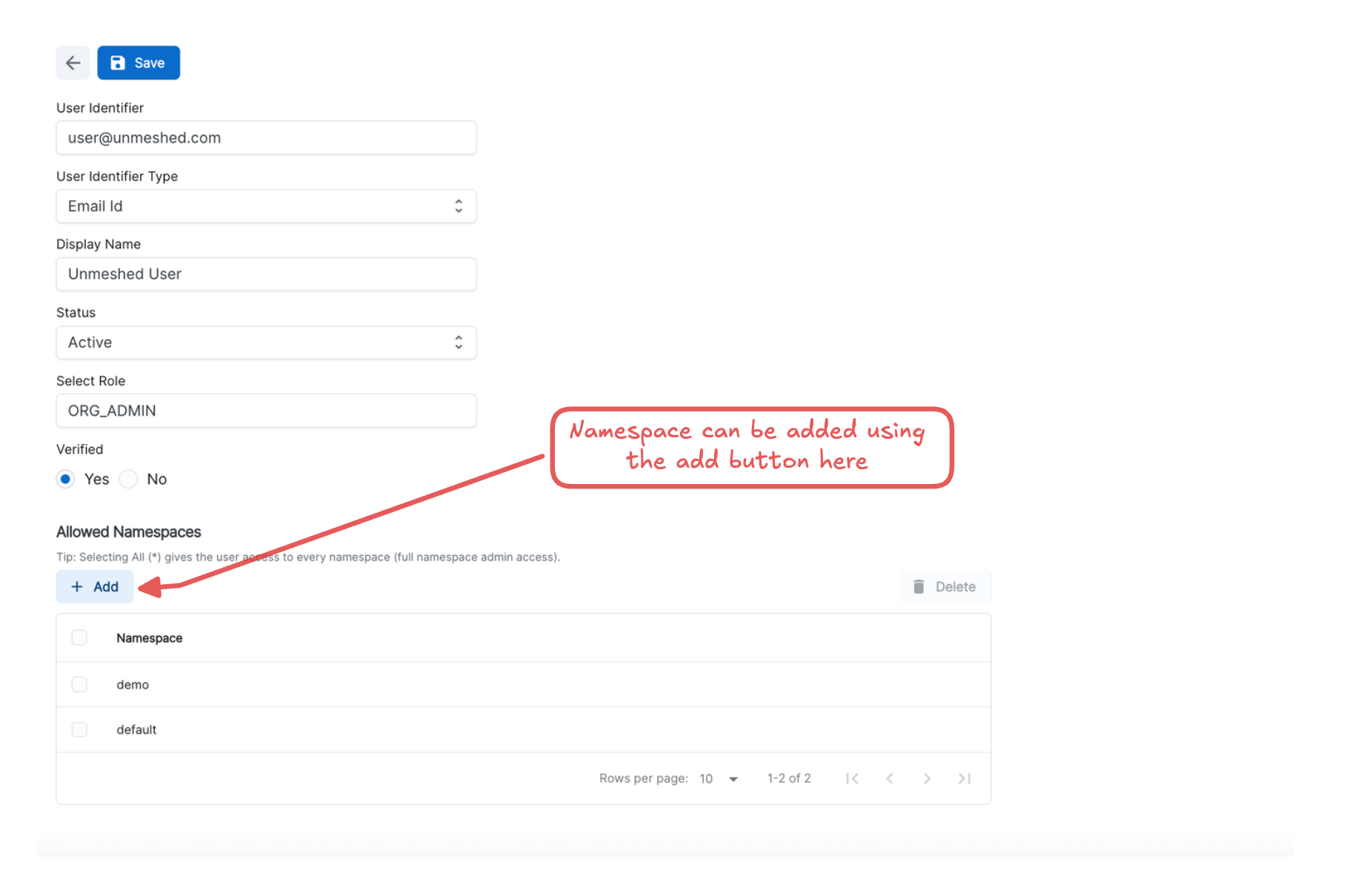
- The administrator edits a user and assigns one or more allowed Namespaces.
- The user can then access only those Namespaces in the UI and APIs.
- Actions (view, execute, create) are limited to the assigned Namespaces.
Assign Namespace Access on the Users Page
- Go to Users.
- Select the user you want to configure.
- In the Namespace access section, choose the Namespaces the user is allowed to access.
- Save changes.
After saving, the permission takes effect for that user.
What the User Can and Cannot Do
When Namespace based permissions are configured:
- A user with
All (*)gets access to all Namespaces. - A user can also delete previously assigned Namespaces.
- Only Namespaces with assigned access are accessible.
- The user can access resources only in assigned Namespaces.
- The user cannot access resources in unassigned Namespaces.
Best Practices
- Grant only the Namespaces a user needs.
- Review namespace assignments regularly, especially when team roles change.