

Ci Cd
Promoting Definitions Across Environments
Promote the definitions in your project repository from development to testing and production with unmeshed update-remote. Configure integration settings, secrets, and variables directly in each target environment; they usually differ between environments.
For the development workflow, see Developing Definitions with the Unmeshed CLI.
The following flow shows the commands used to sync development changes and promote the same reviewed definitions through testing and production:
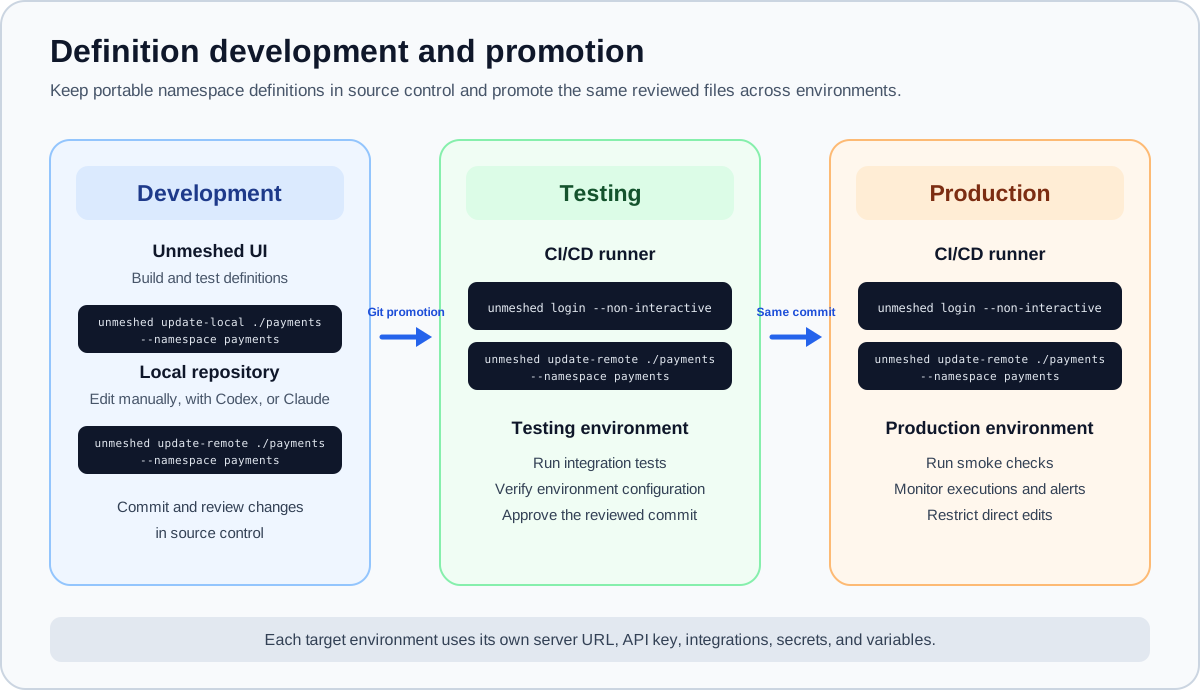
Limit edit access in production so routine definition changes are promoted from reviewed source control through the CI/CD workflow. Reserve direct production access for authorized operational or emergency work, and reconcile any emergency change with the repository afterward.
Authenticate with the target environment
In a pipeline, provide the target server URL as UNMESHED_ENGINE_URL and the API key as UNMESHED_API_KEY from the environment's secret store. Pass the key to login through stdin, then update the namespace:
Login verifies the API key and makes that server active for the following CLI command. With --non-interactive, missing login inputs cause the job to fail instead of waiting for a prompt. Use the testing server and its credential for testing, then the production server and its credential for production.
update-remote handles only definitions in the folder structure produced by
update-local. Metadata outside these supported folders is not included in
the promotion. Use the Unmeshed REST APIs to update any additional metadata
or resources that do not match this structure.
The namespace directory passed to update-remote can contain these resource folders:
Deployment and rollback behavior
By default, update-remote replaces the supported resources in the target namespace:
- It validates the local definitions and saves a backup of the current remote namespace before changing it.
- It deletes the current remote resources, then uploads all definitions from the local namespace folder.
- If deletion or upload fails, it removes the partial update and attempts to restore the previous definitions from the backup. The command reports a failure, and a failed restoration may need manual recovery.
Definitions that are absent from the local folder are removed from the remote namespace in this default mode. Keep the local folder complete for the namespace you are promoting.
Run it with GitHub Actions
The Setup Unmeshed CLI action on GitHub Marketplace installs the CLI and makes unmeshed available to later steps. For example, configure a GitHub testing environment with a UNMESHED_ENGINE_URL variable and a UNMESHED_API_KEY secret, then use:
Use a separate GitHub environment with the production URL and credential when promoting to production.
The example's concurrency setting prevents overlapping runs of this workflow. A GitHub Environment can require a review before a production job runs, but you must configure that rule in GitHub. See GitHub deployment guidance.
Use another CI/CD platform
The promotion workflow is not tied to GitHub Actions. You can run the same CLI commands from GitLab CI/CD, Jenkins, Azure DevOps, CircleCI, or another system that can execute shell commands.
Configure the pipeline to:
- Check out the reviewed repository revision.
- Install the Unmeshed CLI on the runner.
- Supply
UNMESHED_ENGINE_URLandUNMESHED_API_KEYfrom the CI platform's environment-specific variable and secret store. - Authenticate non-interactively and run
update-remote.
The deployment step can use the same shell commands on any supported runner:
Use the CI platform's approval gates and deployment locking or concurrency controls to protect production and prevent overlapping updates.