TLDR
- Anthropic's own docs put the average at about $13 per developer per active day and $150 to $250 per month. That figure used to say $6 until mid-April 2026.
- The cost, the limits, and the controls change with how you pay, whether that's a seat plan, the Console API, or a cloud provider.
- Usage climbs because the full conversation goes with every request. Long sessions, cache misses, subagents, and agent teams (about 7x more tokens in plan mode) all add to it.
- Control it in order, which is measure a pilot, set spend limits, then cut tokens.
- Unmeshed puts spend ceilings, bounds tools, and a cost on every run for agents inside workflows. We don't meter Claude Code sessions on a laptop, and the post says so.
Claude Code cost looks small for one developer and gets strange fast for ten, mostly because nobody picked a number first.
So we read what Anthropic itself publishes. Its cost docs say the average is about $13 per developer per active day. That figure used to say $6 until mid-April 2026, and plenty of guides still repeat the old one.
Here's the plan. We'll sort Claude Code cost by how your team pays, explain why usage climbs, and then walk through tracking and capping it. We didn't run a team rollout ourselves, so every number in this post comes from Anthropic or a source we name. Prices are as of November 9, 2026, and they change.
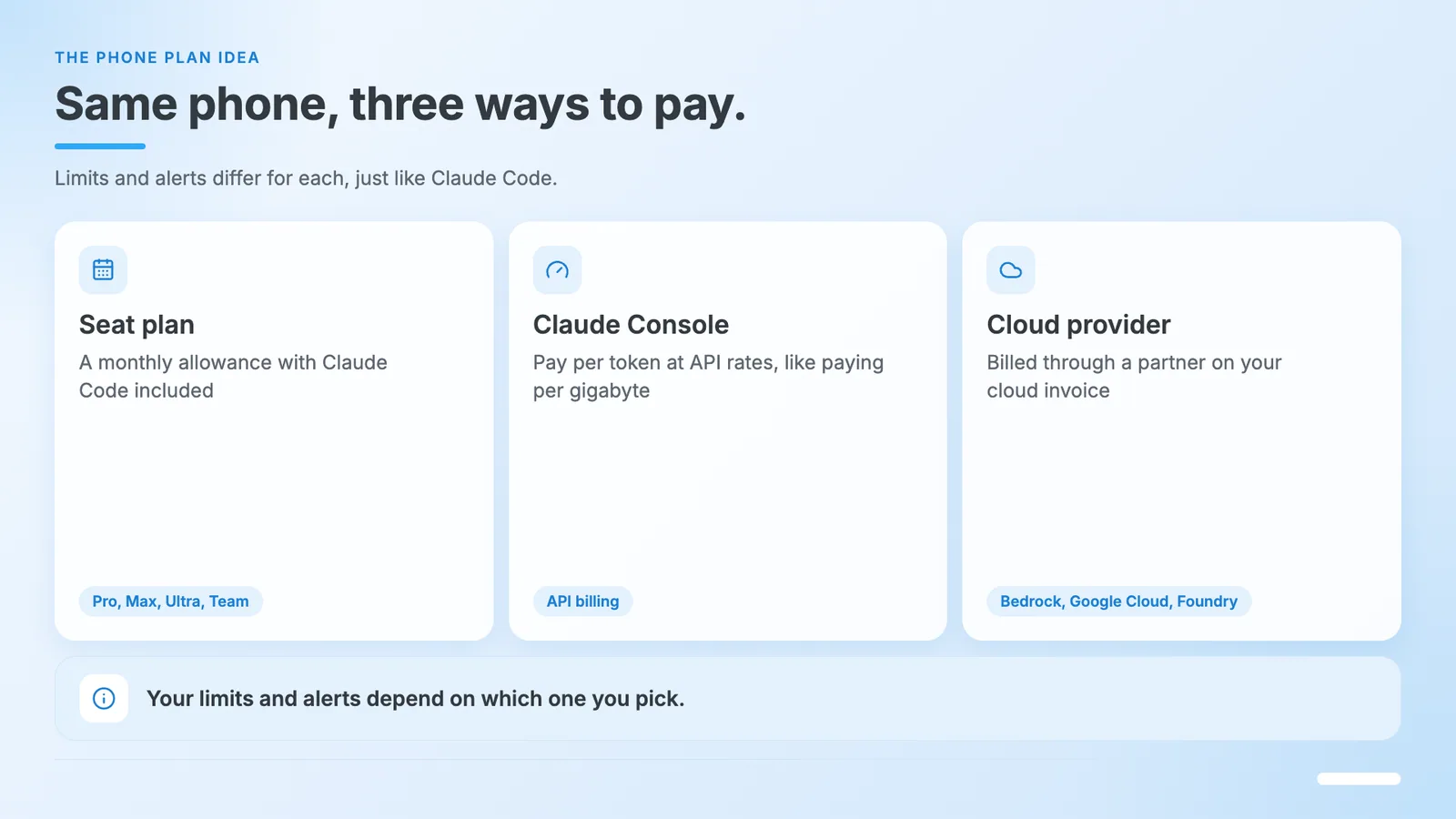
Think of paying for a phone. You can buy a plan with a monthly allowance, pay per gigabyte, or get billed through a partner carrier. Same phone, three ways to pay, and the limits and alerts differ for each. Claude Code works the same way.
We build workflow software, so we'll say where Unmeshed fits near the end, and where it doesn't. Okay, let's get into it.
1. How Much Does Claude Code Cost?
Claude Code cost depends on how you pay. Anthropic says the average is about $13 per developer per active day and $150 to $250 per month across enterprise deployments, with 90 percent of users under $30 a day. On a seat plan, Claude Code is included in the price.
The short version is that there are three ways to pay, and each one limits you differently.
| How You Pay | What You Pay | What Limits You |
|---|---|---|
| Seat plan (Pro, Max, Ultra, Team, Enterprise) | A monthly seat price, with Claude Code included | A usage allowance on a five-hour window and a weekly window |
| Claude Console (API) | Per token, at API rates | Workspace spend limits and rate limits |
| Bedrock, Google Cloud, or Foundry | Per token, on your cloud bill | Your cloud provider's budget controls |
The phone comparison holds here. The seat plan is the monthly allowance. The Console is pay per gigabyte. The cloud route is the partner carrier, and your invoice comes from them.
We cover each plan's Claude Code pricing below. If you're on the API side, our post on API costs goes deeper on per-token savings.
2. What Does a Team Actually Spend on Claude Code?
Anthropic's own docs put the average team cost at about $13 per developer per active day. In April 2026, it raised that from $6 and said the change reflects Opus becoming the main model, not a price change. Spend varies with model, codebase size, and how many sessions run at once.
Business Insider reported the change on April 29. An Anthropic spokesperson told it there was no pricing or product change, and that the old figures dated from when an older model was the default. The 90 percent ceiling moved from $12 to $30 a day at the same time.
A quick bit of arithmetic, and we mean arithmetic, not a measurement. At $13 a day, 12 active days a month comes to $156 and 19 active days comes to $247. That lines up with the $150 to $250 monthly range the docs give.
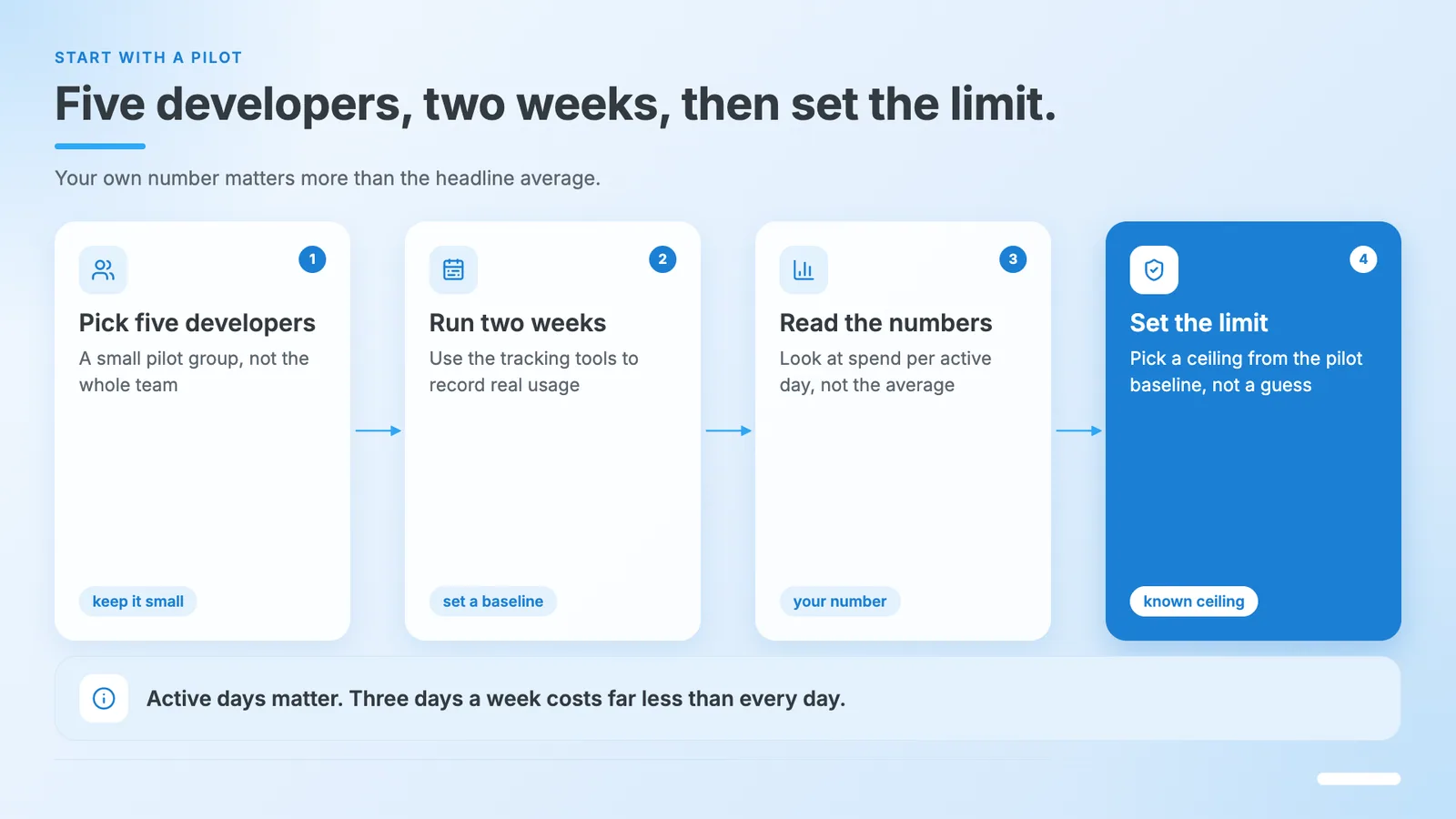
Notice the words "per active day." A developer who uses Claude Code three days a week costs far less than one who runs it all day, every day. The average hides that gap, so your own number matters more than the headline.
Anthropic's head of growth told Business Insider's readers that current plans "weren't built for this" level of usage. Read that as a hint that limits and prices may keep moving.
The docs give one clear piece of advice on Claude Code cost. Start with a small pilot group and use the tracking tools to set a baseline before you roll it out wider. We'd do the same.
3. How Does Claude Code Pricing Work by Plan?
Claude Code pricing comes in two forms. Seat plans: Pro at $20, Max at $100, Ultra at $200, and Team and Enterprise seats include Claude Code inside a usage allowance. API and cloud billing charge per token instead. Both are priced as of November 2026 and can change.
Here's what the Claude pricing page shows.
| Plan | Price | What It Adds |
|---|---|---|
| Pro | $20 monthly ($17 if billed annually) | Claude Code, more usage than Free |
| Max | $100 monthly | 5x Pro usage every five hours and every week |
| Ultra | $200 monthly | 10x Pro weekly usage, no five-hour limit for verified accounts |
| Team standard seat | $20 per seat billed annually ($25 monthly) | Admin controls and more usage than Pro |
| Team premium seat | $100 per seat billed annually ($125 monthly) | 5x the usage of a standard seat |
| Enterprise | $20 per seat plus usage at API rates, 20 seat minimum | Spend limits, audit logs, SSO and SCIM |
Two things stand out. First, Claude Code shares the plan's usage pool with chat, so a heavy coding day eats into the same allowance. Second, Enterprise seats are cheap on paper because the bulk of the spend rides on top at API rates.
If you pay per token, these are the model rates per million tokens.
| Model | Input | Output |
|---|---|---|
| Opus 5.5 | $4 | $20 |
| Sonnet 5.5 | $2 | $10 |
| Haiku 5.5 | $0.10 | $0.50 |
| Fable 5.1 | $10 | $50 |
Cached input is much cheaper than fresh input, and batch processing takes 50 percent off. Check the page before you budget, since it changes.
4. How Do Claude Usage Limits Work in Claude Code?
Claude usage limits on seat plans reset on a rolling five-hour window plus a weekly window, shared across Claude chat, Cowork, and Claude Code. Hitting one is not the same as hitting a spend limit. Admins can add usage credits to keep people working past the allowance.
People mix up the messages, so here's a decoder based on the docs.
| What You See | What It Means | What You Can Do |
|---|---|---|
| You've hit your session limit | You used the five-hour window | Wait for the reset or ask for usage credits |
| You've hit your weekly limit | You used the weekly allowance | Wait for the reset or ask for usage credits |
| You've hit your Opus limit | A limit on one model family | Switch to a different model family with /model |
| Individual or org spend limit | Usage credits hit a cap an admin set | An admin raises the limit, or you wait |
| Context or auto compact warning | Not a usage limit; the conversation is getting long | Clear or compact the conversation |
Session and weekly limits apply across all models, so switching models won't restore access. Opus and Sonnet limits are different, and a switch to another family does keep you working.
To see where you stand, run /usage. On seat plans it shows plan usage bars and a breakdown of what counts against your limits, along with suggestions. If you wonder why Claude Code usage felt heavy this week, that screen is the first place to look.
Newer versions can also wait out a limit and continue the interrupted task after the reset, so a long run doesn't stall for good. Claude Code limits are a fact of life on any seat plan, and the goal is to know which one you hit.
5. Why Does Claude Code Token Usage Climb in Long Sessions?
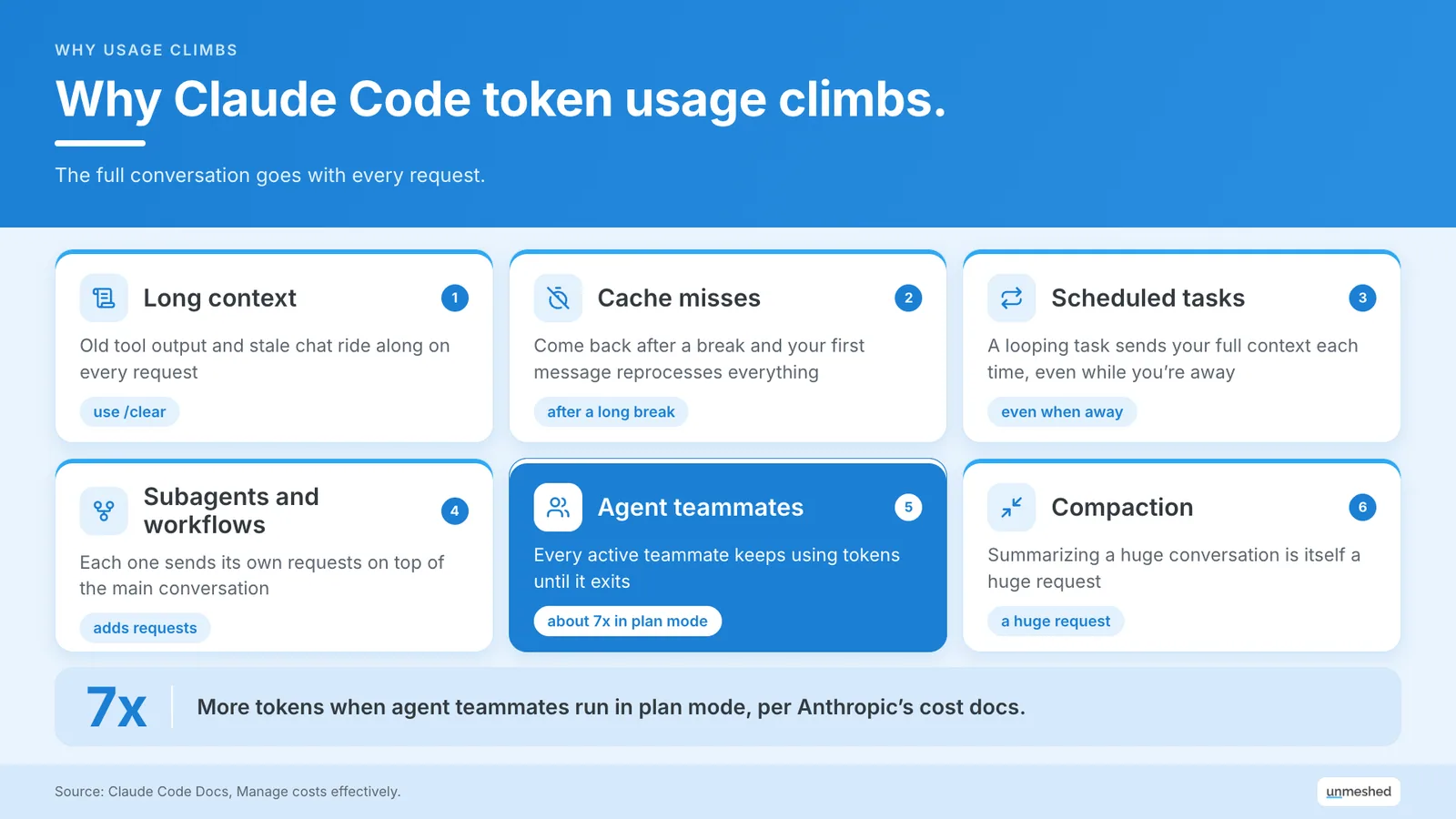
Claude Code token usage climbs because the full conversation goes with every request. A long session, a cache miss after a break, subagents, scheduled tasks, and agent teams each add requests that carry that context. Agent teams use about 7x more tokens when teammates run in plan mode.
In kid terms, Claude reads the whole story again every time you ask a question. Caching makes that cheaper, but a long story still costs more to read again than a short one. A one-line question at the end of an all-day session can cost more than a long question in a fresh one.
The docs list the usual causes.
- Long context: Every request carries the history, so old tool output and stale chat keep costing you.
- Cache misses: Come back after a break longer than the cache lifetime, and your first message reprocesses everything.
- Scheduled tasks and check-ins: A looping task fires on its interval and sends your full context each time, even while you're away.
- Subagents and workflows: Each one sends its own requests on top of the main conversation.
- Agent teammates: Every active teammate keeps using tokens until it exits.
- Compaction: Summarizing a huge conversation is itself a huge request.
If you want the wider idea, our guide to token efficiency explains how teams lose money on tokens and how to measure it.
6. How Do You Track Claude Code Cost for a Team?
You track Claude Code cost with the tool that matches how you pay. Seat plans use the admin spend report and analytics. API orgs use the Console and the Claude Code Analytics API. Cloud provider users need OpenTelemetry or a gateway, since Anthropic's dashboards do not cover them.
One warning before the details. The dollar figure in /usage is an estimate computed on your machine at list price. If your organization pays contracted rates, an admin can set a modelPricing value so the numbers match your deal. For billing, the Console is the authority.
On Claude Team or Enterprise Seats
On Team and Enterprise plans, each member draws from a seat allowance. Admins see estimated spend per user and model in the spend report, export a CSV, and set usage credit limits at org, group, or member level. Enterprise adds an Analytics API. Usage inside the allowance isn't metered in dollars.
That last point trips people up. If everyone stays inside their allowance, the spend report can look empty even though people are using Claude Code heavily. The adoption dashboard shows sessions and active users instead.
On the Claude Console API
API organizations pay per token and track it in the Console. Claude Code gets its own workspace where you can set spend limits and a workspace rate limit. The Console dashboard and the Claude Code Analytics API show daily spend and accepted lines per member.
The docs also suggest per-user rate limits by team size. Here are a few rows.
| Team Size | Tokens Per Minute Per User | Requests Per Minute Per User |
|---|---|---|
| 1 to 5 users | 200k to 300k | 5 to 7 |
| 5 to 20 users | 100k to 150k | 2.5 to 3.5 |
| 20 to 50 users | 50k to 75k | 1.25 to 1.75 |
| 100 to 500 users | 15k to 20k | 0.37 to 0.47 |
The numbers shrink as teams grow because fewer people use it at the same moment. The docs list more sizes and note that these limits apply to the whole organization, so one person can borrow headroom when others are idle.
On Bedrock, Google Cloud, or Foundry
On Bedrock, Google Cloud, or Foundry, your cloud bill carries Claude Code spend, and Anthropic's analytics do not cover it. For per-user numbers, you can export OpenTelemetry metrics, run a Claude apps gateway, or route traffic through an LLM gateway such as LiteLLM, which the docs say is unaffiliated and unaudited.
If you're weighing the gateway route, we explain what an LLM gateway does. For the metrics side, see our guide to LLM observability. We haven't tested these tools with Claude Code, so check them against your own setup.
7. How Do You Control Claude Code Cost?
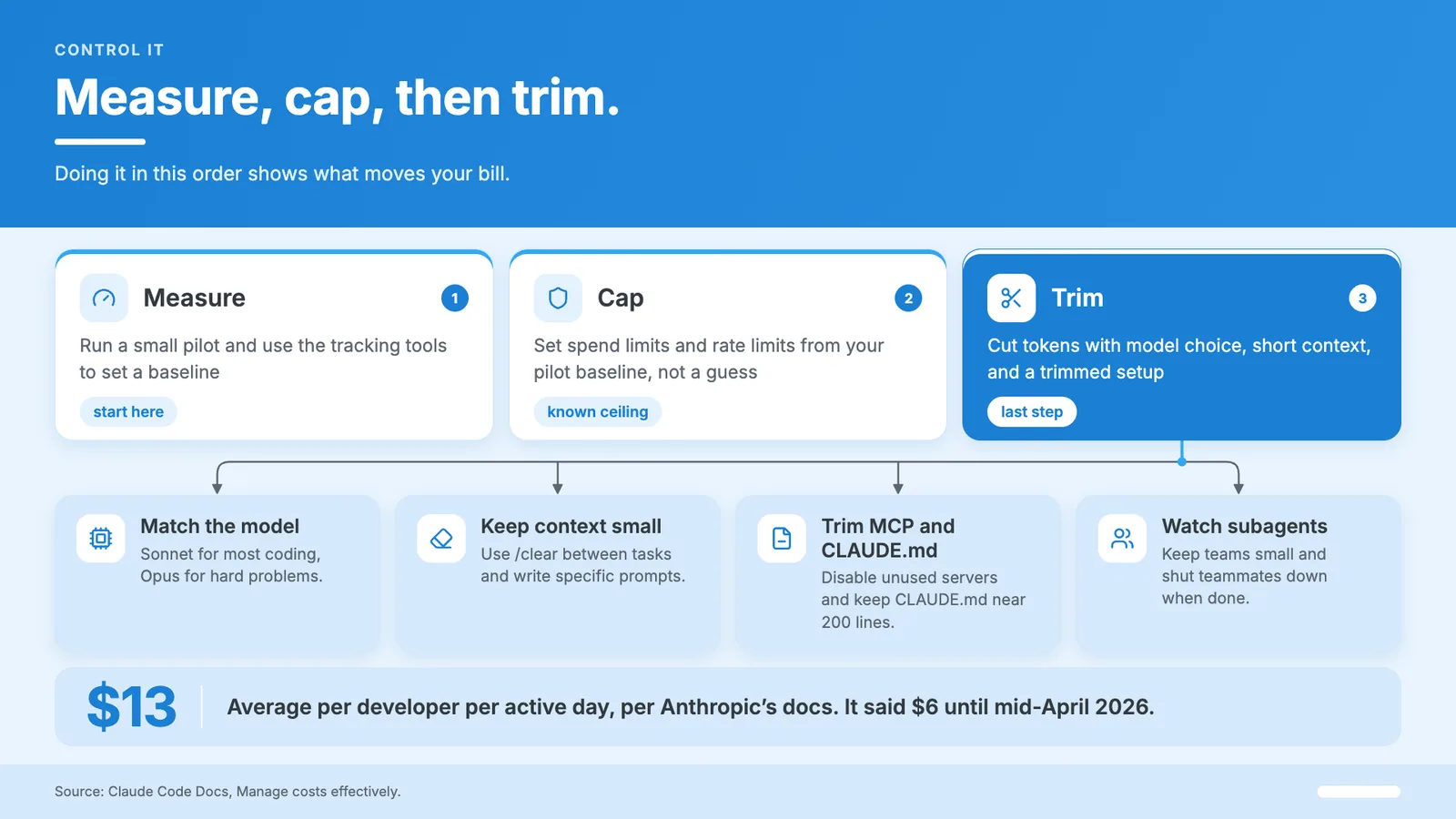
You control Claude Code cost in three steps. Measure first with a pilot and the tracking tools, cap next with spend limits and rate limits, then cut tokens with model choice, short context, and a trimmed setup. Doing it in that order shows what moves your bill.
Most teams jump straight to cutting tokens, and that's the mistake. Without a baseline, you can't tell if a change worked. Measure, cap, then trim, and your Claude Code cost gets easier to predict.
Match the Model to the Job
Use a lighter model for routine coding and keep the strongest one for hard problems. Anthropic's docs say Sonnet handles most coding tasks and costs less than Opus. You can switch with /model and lower effort with /effort. Some current models cannot turn off extended thinking.
A note on the last part. Thinking tokens bill as output tokens, so on simple tasks a lower effort level is the easiest saving. A subagent that only runs tests can use the smallest model.
Keep Context Small
Clear the conversation when you switch tasks, because stale context rides along on every message. Use /clear between unrelated work, add compaction instructions when you do compact, and write specific prompts. Vague requests trigger broad scanning that reads far more files than you need.
"Add input validation to the login function in auth.ts" beats "improve this codebase" every time. If you write a lot of prompts, our guide to prompt optimization covers the habit in more depth.
Plan mode helps too. Claude explores and proposes an approach before it edits, so you catch a wrong direction before it gets expensive.
Trim MCP Servers and CLAUDE.md
Disable MCP servers you aren't using and prefer plain command line tools where they exist. Keep CLAUDE.md short, under about 200 lines per the docs, and move workflow detail into skills that load only when needed. Both shrink the context carried on every request.
Tool definitions are loaded on demand now, so the cost is smaller than it used to be, but it isn't zero. Run /context to see what's taking space. If you're curious what teams use MCP servers for, we wrote that up too.
Watch Subagents and Agent Teams
Subagents and agent teams each run their own context window, so cost grows with how many you run and how long they stay alive. Use Sonnet for teammates, keep teams small, keep spawn prompts focused, and shut teammates down when the work ends.
Agent teams are off by default, which is a good sign. Turn them on for a task that earns it, not as a habit.
Set Spend Limits
Spend limits turn a surprise into a known ceiling. Seat plans can cap usage credits per member, group, or org. The Console supports workspace spend limits. Cloud users set budgets in their provider. Pick a number from your pilot baseline, not a guess.
That covers developers at their keyboards. For model-level savings on the API side, see our post on cost optimization.
8. How Does Unmeshed Fit With Claude Code Cost Control?
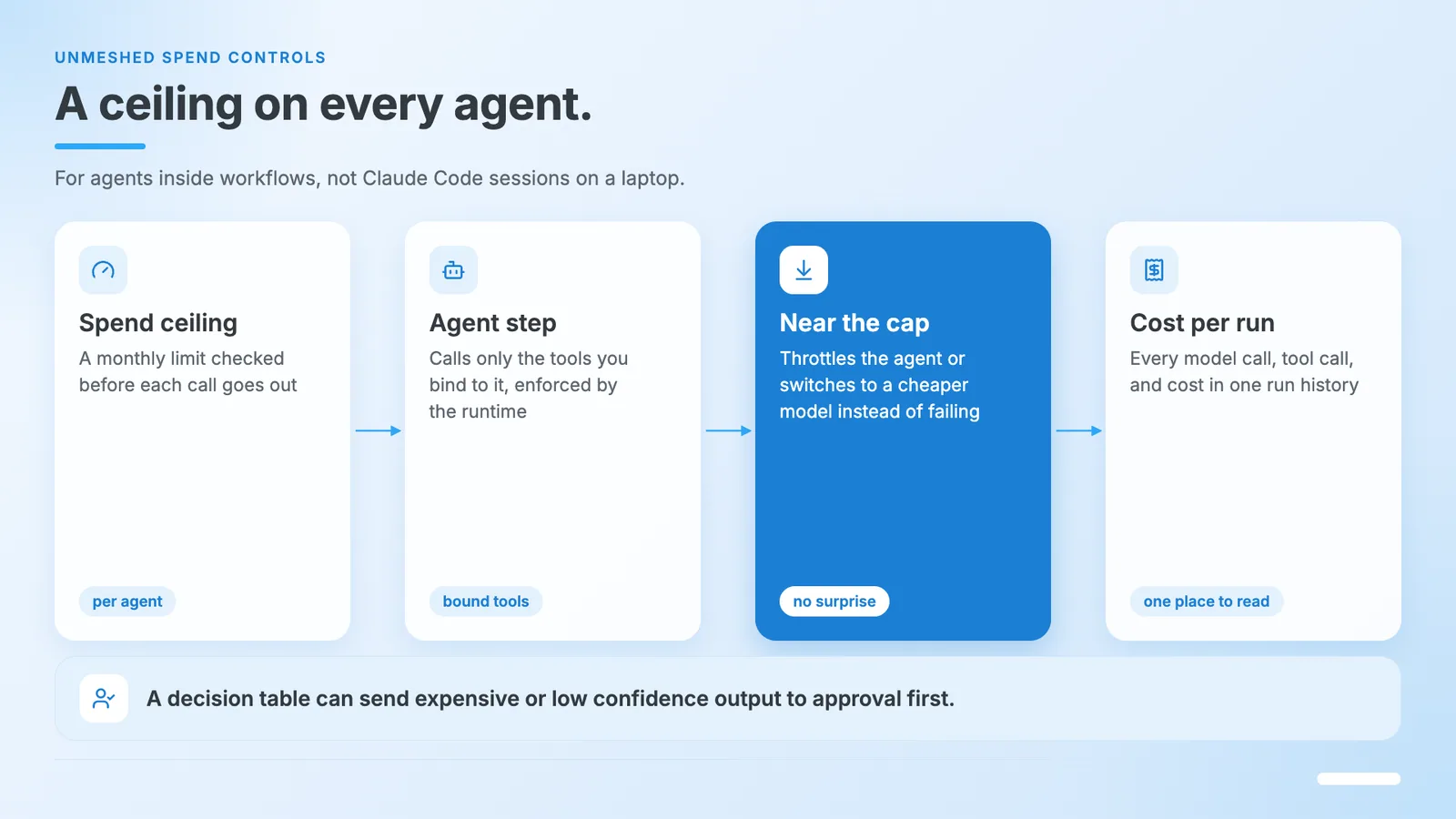
Unmeshed puts a ceiling on agents that run as steps inside a workflow. Each agent gets a monthly spend limit, bound tools, and a logged cost per run. Near its cap, the workflow can throttle it or switch to a cheaper model. We don't meter Claude Code sessions on a laptop.
Let's be clear about the line. Your seat admin or the Console tells you what developers spend in their editors. We care about the other side, the agents you automate. Think of an agent that runs on a schedule, inside a pipeline, or behind a request, where no person is watching the meter.
- A spend ceiling per agent: Set a monthly limit, and the workflow checks it before a call goes out.
- Throttle or downgrade near the cap: The agent slows down or moves to a cheaper model instead of failing outright.
- Tools bound by the runtime: An agent can call only what you bind to it, and the runtime enforces it, not the prompt.
- A cost on every run: Each model call, tool call, and cost lands in the run history, so you read one place instead of five.
- People when it matters: A decision table can send an expensive or low-confidence output to approval steps before it goes out.
You can see the full model on our agent governance page, and the wider picture in our guide to agentic workflows. We're model agnostic and MCP native, and our free tier includes 1,000 agent calls a month.
Now the honest part. We're not a Claude Code usage tracker, and we won't replace your seat admin or the Console. You still pick the models, the pilot, and the numbers.
Stop Finding Out On The Invoice.
Give each agent a monthly ceiling, a fixed set of tools, and a cost on every run, so the bill never surprises you.
Set A CeilingConclusion
Claude Code cost stops being a surprise once you pick the setup, measure a pilot, and set a ceiling. Anthropic's own average is a starting point, not a promise. Your number depends on your model, your habits, and how long your sessions run.
Where teams get caught is the gap between the average and their own. One person leaves a loop running all weekend, or a team turns on agent teams for fun, and the bill moves. Back to the phone plan. Nobody picks one without checking the allowance, and Claude Code deserves the same look.
This week, pick five developers, run two weeks, and read the numbers. Then set the limit. For the agents you automate, that's the part Unmeshed handles, with ceilings and a log on every run.
Frequently Asked Questions
Sources
Token bill climbing?
Show us the agent. We'll show you where spend leaks.
Share how your agents run today, and we'll point out where a ceiling, a cheaper model, or a human check would cap the cost.